
Feature Processor#
The main entry point for extracting geometric features from BRep shapes.
Note
Prerequisites: Attributed Adjacency Graph (AAG)
Tip
Tutorial Data File: nist_ctc_02_asme1_nx1980_rc-ap242e3.stp
Feature Recognition Module#
This module provides tools to recognize and extract various features from Boundary Representation (BRep) shapes, such as blends, cavities, sharp edges, and sheet metal features, through graph-based algorithms. It aims to simplify the process of analyzing complex 3D models.
Note: As of V0.6.0, the module has been restructured. The old class names (
FeaturesRecognizer,RecognizeBlends,RecognizeCavitivies) remain available as aliases for backward compatibility, but the new names are recommended for new code.
FeatureProcessor - The Main Entry Point#
The FeatureProcessor class is the main orchestrator for feature recognition and manipulation. It provides a clean API for:
Feature extraction: Blends, cavities, sharp edges, and sheet metal features
Feature querying: Count, existence checks, and type-specific access
Feature filtering: By radius, depth, category, location, and more
Visualization: Display features in a 3D viewer
Constructor#
from volmdlr_tools.features import FeatureProcessor

processor = FeatureProcessor(
    shape: Union[shapes.Shell, shapes.Solid],
    aag: Optional[AttributedAdjacencyGraph] = None,
    name: str = ""
)
Parameters:
shape: The BRep shape to analyze (Shell or Solid)aag: (Optional) Pre-computed Attributed Adjacency Graphname: (Optional) Instance name
Feature Extraction Methods#
General Extraction#
Method |
Description |
|---|---|
|
Extract all available features (auto-detects sheet metal) |
|
Extract blend/fillet features |
|
Extract cavity features (holes, pockets) |
|
Extract sharp edge features |
|
Extract rib features and rib structures. Not part of |
Ribs#
Rib recognition follows Lai et al. (2017), Recognition and decomposition of rib features in thin-shell plastic parts for finite element analysis. A rib is a thin protruding wall — two opposing end faces a thin gap apart, standing on the surrounding part walls. Ribs that meet at T- or X-junctions are additionally grouped into rib structures.
It is opt-in rather than part of extract_all(), because recognition walks the
whole face-adjacency graph and costs noticeably more than the other extractors.
max_thickness bounds the wall gap in the model’s units. Omit it and the
threshold is derived from the part’s bounding-box diagonal and then tightened to
the walls actually measured, so millimetre fixtures and metre-scale parts both
work without an explicit value. Read back the threshold that was applied with
processor.rib_max_thickness.
pair_finder selects how candidate wall pairs are found: "edge_driven"
(default — matched parallel boundary edges on host faces, fastest),
"face_pair" (the classic anti-parallel planar face-pair search), or the
experimental "nearly_planar" (face-pair search that also admits almost-flat
BSpline/Offset walls, e.g. drafted automotive skins).
processor = FeatureProcessor(shape=solid)
processor.extract_ribs()

print(f"{len(processor.ribs)} ribs, {len(processor.rib_structures)} structures")
print(f"threshold applied: {processor.rib_max_thickness}")

for rib in processor.ribs:
    print(rib.thickness, rib.end_face_nodes, rib.shell_face_nodes)
Measuring ribs for design rules#
Recognized ribs can be measured with
volmdlr_tools.features.measurements.RibThicknessMeasurement — the geometric
quantities molding design rules compare (b <= e x rib_factor): the rib’s
thickness at its root (b, taken just above the junction with the part
wall, above any root fillet) and the thickness of each part wall it stands
on (e, per attached face plus a robust median). The rule verdict itself
(material factor, tolerance, PASS/FAIL) is deliberately left to the caller —
factors are client and material policy.
from volmdlr_tools.features.measurements import RibThicknessMeasurement

for rib in processor.ribs:
    measurement = RibThicknessMeasurement.from_rib(processor.aag, rib)
    print(measurement.root_thickness, measurement.wall_thickness,
          measurement.wall_thickness_by_base_node)
Sheet Metal Specific Extraction#
Method |
Description |
|---|---|
|
Extract all sheet metal features (bends, jogs, notches, etc.) |
|
Extract deformation features (emboss, flanged cutouts) — region-based by default; pass |
|
Extract lance features |
Usage Examples#
from volmdlr_tools.features import FeatureProcessor
from volmdlr.model import VolumeModel

# Load shape
volume_model = VolumeModel.from_step("data/step/nist_ctc_02_asme1_nx1980_rc-ap242e3.stp")
shape = volume_model.primitives[0]

# Create processor
processor = FeatureProcessor(shape=shape)

# Option 1: Extract all features automatically
processor.extract_all()

# Option 2: Extract specific features
processor.extract_blends(max_radius=0.05)
processor.extract_cavities()
processor.extract_sharp_edges()

# Option 3: For sheet metal parts
if processor.is_sheet_metal:
    processor.extract_sheet_metal_features()
Feature Access Properties#
After extraction, access features through read-only properties that return immutable tuples:
General Features#
Property |
Returns |
Description |
|---|---|---|
|
|
All extracted blend features |
|
|
Blends grouped by connectivity and radius |
|
|
All cavity features (includes Round, Rectangular, Slotted) |
|
|
All sharp edge features |
|
|
Rib segments. Raises until |
|
|
Rib segments grouped at junctions. Raises until |
|
|
Wall-thickness threshold actually applied; |
Sheet Metal Features#
Property |
Returns |
Description |
|---|---|---|
|
|
Sheet metal bend features |
|
|
Offset bend (jog) features |
|
|
Notch cut features |
|
|
Corner features |
|
|
Corner relief features |
|
|
Emboss deformation features |
|
|
Lance features |
|
|
Louvre features |
|
|
Unclassified features |
Usage Examples#
# Access blends
for blend in processor.blends:
    print(f"Blend radius: {blend.radius}, widest point: {blend.widest_radius}")

# Access blend chains
for chain in processor.blend_chains:
    print(f"Chain with {len(chain)} blends, radius: {chain.radius}")

# Access cavities
for cavity in processor.cavities:
    print(f"Cavity type: {type(cavity).__name__}")

# Access sheet metal bends
for bend in processor.bends:
    print(f"Bend angle: {bend.angle}")
Feature Query Methods#
extractions_run -> frozenset[str]#
Which extractions have run, by extract_* method name. This is what tells an
empty result apart from an unattempted one: "blends" in the set means
extract_blends() has run, so an empty processor.blends means the part has no
fillets. Absent, it means nobody looked.
processor.extractions_run          # frozenset()
processor.extract_blends()
processor.extractions_run          # frozenset({'blends'})
Reading a feature collection whose extractions have all not run raises an
UnextractedAccessError naming the extract_* call that satisfies the
precondition. Once that call has run, the same property answers normally, and an
empty answer means the part has none:
from volmdlr_tools.features import UnextractedAccessError

processor.cavities  # UnextractedAccessError: cavities read before extract_cavities() ...
processor.extract_cavities()
processor.cavities  # [] now means the part has no cavities
The message also names extractions_run, so a caller that would rather branch
than catch can test the precondition itself:
if "cavities" in processor.extractions_run:
    ...  # safe to read processor.cavities
Clearing an extraction’s features removes it from the set again, since its result no longer exists — the collection refuses once more until the extraction is re-run. A pass stays in the set while any of the feature types it owns still holds a result, so a partial clear does not un-run it; and a clear that discards nothing un-runs nothing, so a pass that legitimately found nothing keeps its place rather than asking to be re-run.
get_feature_count() -> FeatureCounts#
Count the extracted features by type, over the extractions that have run. A
dict that also names what it was counted over: a type an extraction looked for
but did not find is reported as 0, and a type whose extraction never ran is
absent entirely.
processor.extract_blends()
counts = processor.get_feature_count()
# {'Blend': 12, 'BlendChain': 4}

counts.extractions_run             # frozenset({'blends'})
'Cavity' in counts                 # False - extract_cavities() has not run

for feature_type, count in counts.items():
    print(f"{feature_type}: {count}")
has_features(feature_type=None) -> bool#
Check if features exist.
from volmdlr_tools.features.feature_types import Blend, Cavity

# Check if any features exist
if processor.has_features():
    print("Features have been extracted")

# Check for specific feature type
if processor.has_features(Blend):
    print(f"Found {len(processor.blends)} blends")
is_sheet_metal -> bool#
Check if the shape is recognized as sheet metal.
if processor.is_sheet_metal:
    print("Shape is sheet metal - can extract bends, jogs, etc.")
    processor.extract_sheet_metal_features()
else:
    print("Standard part - extracting blends and cavities")
    processor.extract_blends()
    processor.extract_cavities()
Feature Filtering Methods#
Filter Blends#
filtered_blends = processor.filter_blends(
    min_radius: float = None,      # Minimum blend radius
    max_radius: float = None,      # Maximum blend radius
    blend_type: str = None,        # "Ordinary", "Vertex", "Cliff" or "Uncertain"
    confirmed_only: bool = False   # Only confirmed blends
)
blend_type takes the name of a BlendType — "Ordinary", "Vertex", "Cliff" or
"Uncertain" — not the enum’s repr "BlendType.Ordinary". Any other string raises
ValueError listing the valid names, rather than returning an empty list you could not tell
apart from a part that has none of that kind.
Example:
# Get small fillets only
small_fillets = processor.filter_blends(max_radius=0.01)

# Get large fillets
large_fillets = processor.filter_blends(min_radius=0.05)

# Get fillets in a range
medium_fillets = processor.filter_blends(min_radius=0.01, max_radius=0.05)

# Get the edge rounds, leaving out corner patches and cliffs
edge_rounds = processor.filter_blends(blend_type="Ordinary")

# Get only the blends recognition traced to both ends
confirmed = processor.filter_blends(confirmed_only=True)
Filter Blend Chains#
filtered_chains = processor.filter_blend_chains(
    min_radius: float = None,   # Minimum chain radius
    max_radius: float = None,   # Maximum chain radius
    min_length: float = None,   # Minimum chain length
    max_length: float = None    # Maximum chain length
)
Example:
# Get long blend chains
long_chains = processor.filter_blend_chains(min_length=0.1)
Filter Cavities#
filtered_cavities = processor.filter_cavities(
    min_depth: float = None,    # Minimum cavity depth (inclusive)
    max_depth: float = None     # Maximum cavity depth (inclusive)
)
A cavity whose depth is undetermined (Cavity.depth answers None) is excluded
from any bounded query — an unknown depth never reads as a shallow one — but is
present in an unbounded one.
Filter by Category (Sheet Metal)#
Filter features by their category:
# Get all cut features (slots, notches, corner reliefs)
cut_features = processor.filter_by_category("cut")

# Get all forming features (bends, jogs)
forming_features = processor.filter_by_category("forming")

# Filter by location too
boundary_cuts = processor.filter_by_category("cut", location="boundary")
internal_forming = processor.filter_by_category("forming", location="internal")
Valid categories: "cut", "forming", "blend", "cavity", "unknown"
Filter by Location (Sheet Metal)#
Filter features by their location on the sheet metal part:
# Get features on the boundary (perimeter)
boundary_features = processor.filter_by_location("boundary")

# Get internal features (holes, internal cutouts)
internal_features = processor.filter_by_location("internal")
Convenience Methods#
# Get all cut features
cuts = processor.get_cut_features(location=None)  # or "boundary" / "internal"

# Get all forming features
forming = processor.get_forming_features(location=None)
Feature Management Methods#
Clear Features#
from volmdlr_tools.features.feature_types import Blend

# Clear all features
processor.clear_features()

# Clear specific feature type
processor.clear_features(feature_type=Blend)

# Clear and re-extract with different parameters
processor.clear_features()
processor.extract_blends(max_radius=0.1)  # Different radius
Visualization#
show_features(feature_type=None)#
Display features in a 3D BabylonJS viewer.
from volmdlr_tools.features.feature_types import Blend, BlendChain, Cavity

# Show all features (extracts if needed)
processor.show_features()

# Show specific feature type
processor.show_features(feature_type=Blend)
processor.show_features(feature_type=BlendChain)
processor.show_features(feature_type=Cavity)
Each feature type is colored randomly for distinction.
Complete Workflow Example#
from pathlib import Path
from volmdlr.model import VolumeModel
from volmdlr_tools.features import FeatureProcessor
from volmdlr_tools.features.feature_types import Blend, BlendChain, Cavity

# Load the model
step_file = Path("data/step/nist_ctc_02_asme1_nx1980_rc-ap242e3.stp")
volume_model = VolumeModel.from_step(str(step_file))
shape = volume_model.primitives[0]

# Create processor
processor = FeatureProcessor(shape=shape)

# Check what kind of part this is
if processor.is_sheet_metal:
    print("Processing sheet metal part...")
    processor.extract_sheet_metal_features()

    # Access sheet metal features
    print(f"Bends: {len(processor.bends)}")
    print(f"Jogs: {len(processor.jogs)}")
    print(f"Notches: {len(processor.notches)}")

    # Filter by location
    boundary = processor.filter_by_location("boundary")
    internal = processor.filter_by_location("internal")
    print(f"Boundary features: {len(boundary)}")
    print(f"Internal features: {len(internal)}")
else:
    print("Processing standard part...")
    processor.extract_all()

    # Get feature counts
    counts = processor.get_feature_count()
    for name, count in counts.items():
        print(f"  {name}: {count}")

    # Filter blends by radius
    small_blends = processor.filter_blends(max_radius=0.01)
    print(f"Small fillets (r<0.01): {len(small_blends)}")

    # Access blend chains
    for chain in processor.blend_chains:
        print(f"Blend chain: radius={chain.radius:.4f}, length={chain.length:.4f}")

# Visualize all features
processor.show_features()

# Or visualize specific types
processor.show_features(feature_type=Blend)
Low-Level Extractors#
While FeatureProcessor is the recommended way to work with features, you can also use the lower-level extractor classes directly for more control.
BlendExtractor#
Identifies blend features (fillets/rounds) in a BRep model.
Attributes:
aag: The attributed adjacency graphmax_radius: Maximum allowable radiusids: List of face indices identified as blends
Methods:
perform(): Execute blend recognitionget_chains(): Get blend chains (grouped by connectivity and radius)get_blending_faces(): Get faces participating in blendsget_blending_chains_faces(): Get faces grouped by chain
CavityExtractor#
Detects cavities (pockets, holes) in a BRep model.
Methods:
get_pockets_faces(): Returns faces representing detected cavities
Visual Examples#
Blend Recognition#
from pathlib import Path
from volmdlr.model import VolumeModel
from volmdlr_tools.features import FeatureProcessor
from volmdlr_tools.features.feature_types import Blend, BlendChain, Cavity

# Load shape
step_file = Path("data/step/nist_ctc_02_asme1_nx1980_rc-ap242e3.stp")
volume_model = VolumeModel.from_step(str(step_file))
shape = volume_model.primitives[0]

# Create processor and extract blends
processor = FeatureProcessor(shape=shape)
processor.extract_blends(max_radius=0.05)

# Show blends
processor.show_features(feature_type=Blend)
Result:#
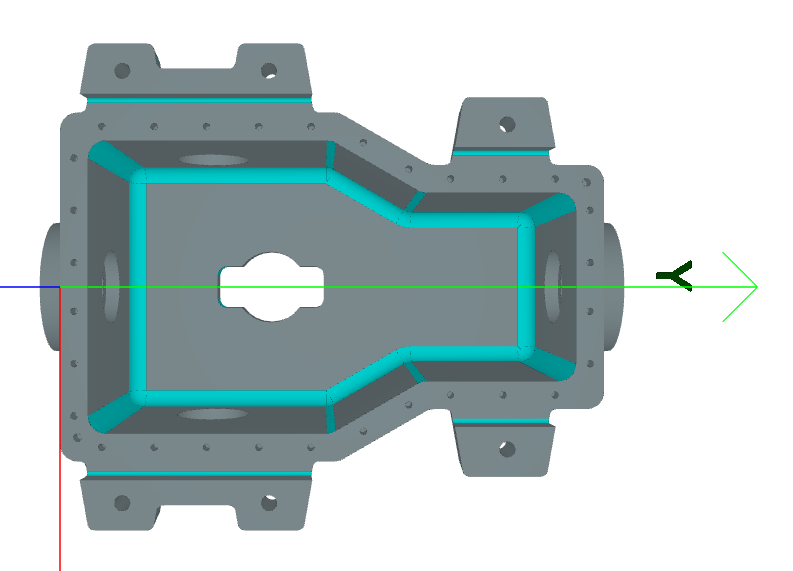
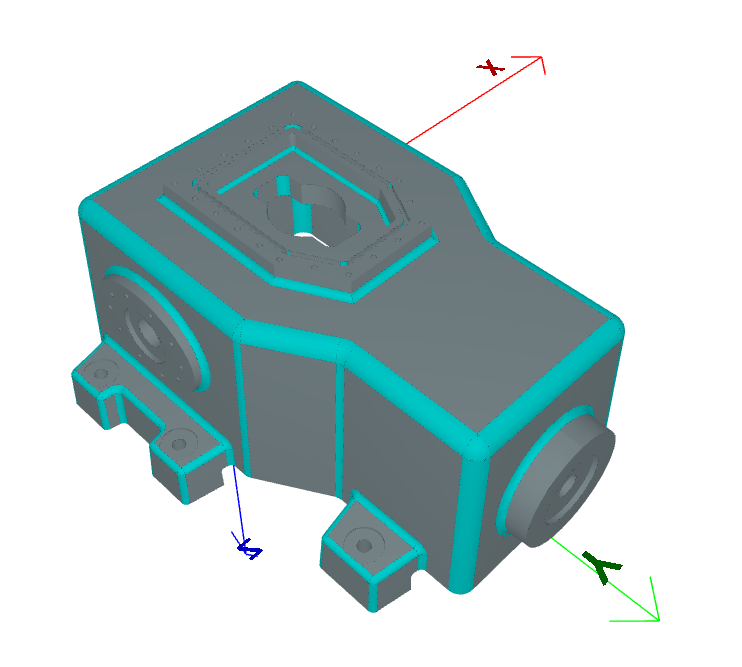
Blend Chains#
# Access blend chains (grouped by connectivity and radius)
for chain in processor.blend_chains:
    print(f"Chain radius: {chain.radius}, length: {chain.length}")

# Visualize blend chains
processor.show_features(feature_type=BlendChain)
Result:#
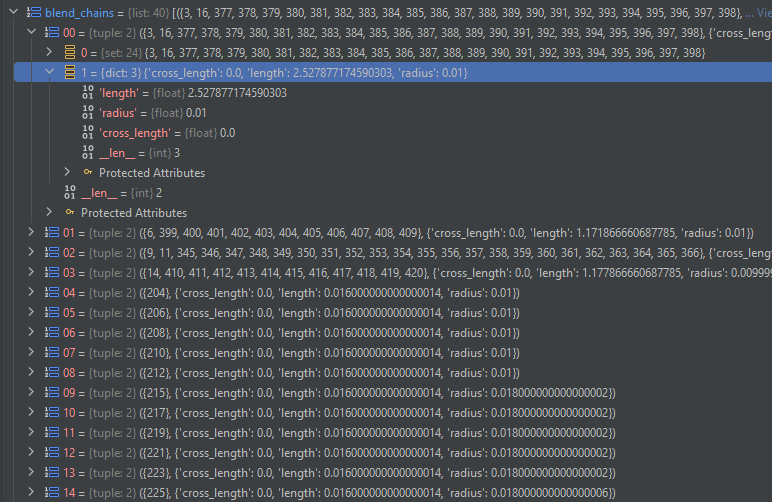
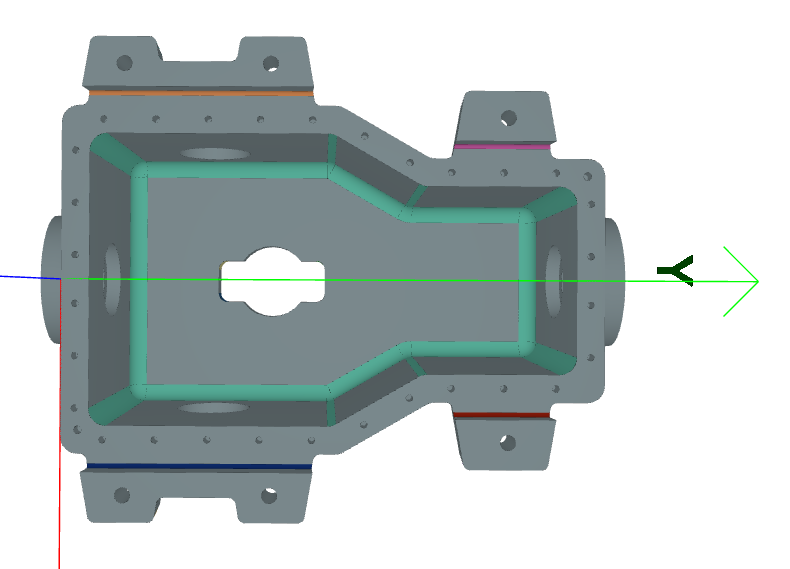
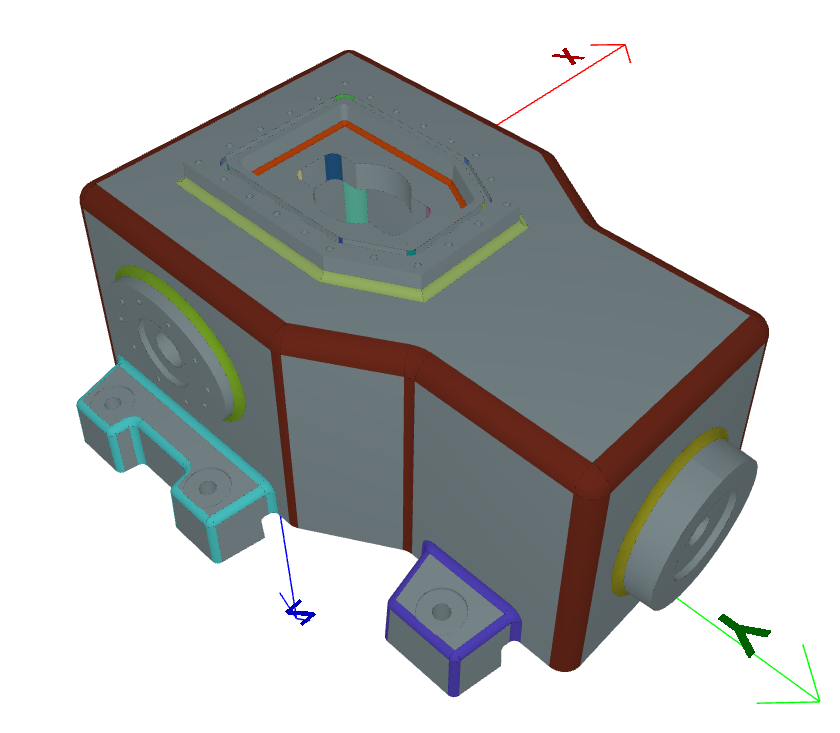
Cavity Recognition#
# Extract and visualize cavities
processor.extract_cavities()

# Access cavities
for cavity in processor.cavities:
    print(f"Cavity type: {type(cavity).__name__}")

# Visualize
processor.show_features(feature_type=Cavity)
Result:#
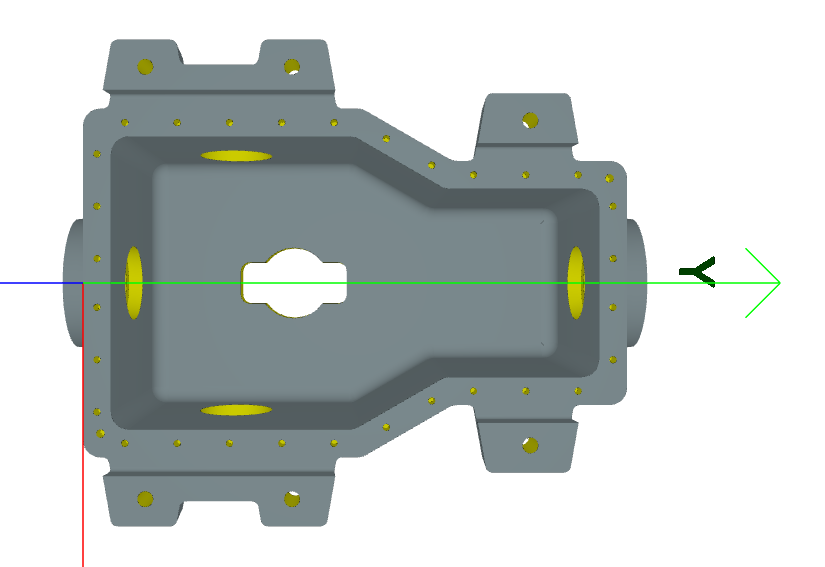
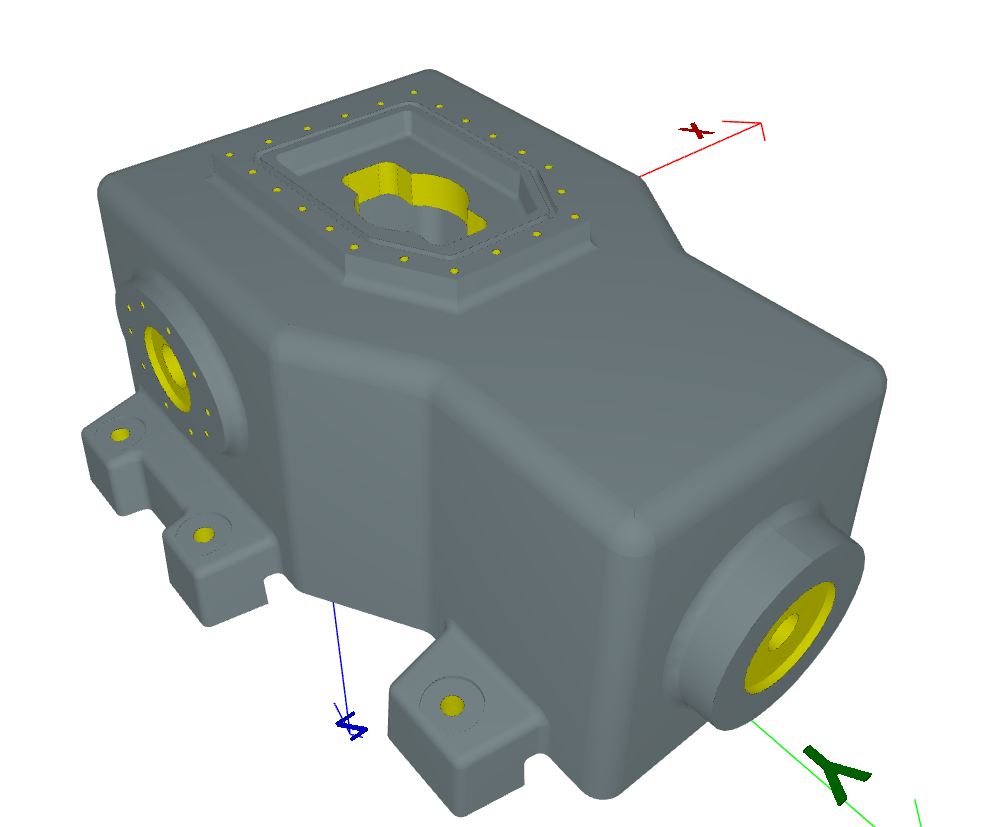
Example Script#
Full working script using the feature recognition pipeline:
 1"""Script to showcase the feature recognition module."""
 2
 3from pathlib import Path
 4
 5from volmdlr.model import VolumeModel
 6
 7from volmdlr_tools import features_recognition
 8from volmdlr_tools.features.feature_types import Blend, BlendChain, Cavity
 9
10folder = Path(__file__).resolve().parent.parent / "data" / "step"
11
12# STEP_FILE = folder / "test_faces.step"
13# STEP_FILE = folder / "nist_ctc_01_asme1_nx1980_rd-ap242e3.stp"
14STEP_FILE = folder / "nist_ctc_02_asme1_nx1980_rc-ap242e3.stp"
15# STEP_FILE = folder / "nist_ctc_03_asme1_nx1980_rc-ap242e3.stp"
16# STEP_FILE = folder / "nist_ctc_04_asme1_nx1980_rd-ap242e3.stp"
17# STEP_FILE = folder / "nist_ctc_05_asme1_nx1980_rd-ap242e3.stp"
18
19
20volume_model = VolumeModel.from_step(str(STEP_FILE))
21volume_model.display_3d(show_curves=True)
22
23shape = volume_model.primitives[0]
24
25# Create a FeaturesRecognizer object with the shape
26features_processor = features_recognition.FeatureProcessor(shape=shape)
27# --- Blends Recognition ---
28# Choose the maximum allowable radius of a blend face.
29features_processor.extract_blends(max_radius=0.05)
30
31# Get blending faces.
32features_processor.show_features(feature_type=Blend)
33
34features_processor.show_features(feature_type=BlendChain)
35
36
37# --- Cavitivies Recognition ---
38features_processor.extract_cavities()
39cavitivies_features = features_processor.cavities
40dt = features_processor.features_volume_model(features_processor.cavities + features_processor.blends).cad_view()
41
42features_processor.show_features(feature_type=Cavity)
43
44# --- Sharp edges Recognition ---
45features_processor.extract_sharp_edges()
46# sharp_edges_feature = features_processor.sharp_edges
47# Get sharp edges.
48sharp_edges = features_processor.sharp_edges
49for edge in sharp_edges:
50    edge.color = (1.0, 0.0, 0.0)
51vol_model = VolumeModel([shape, *sharp_edges])
52vol_model.display_3d(show_curves=True)
53
54features_processor.check_platform()
55# features_processor.aag.check_platform()
56# sharp_edges_feature.check_platform()
See Also#
Attributed Adjacency Graph (AAG) - Attributed Adjacency Graph
Sheet Metal Features - Sheet metal feature extraction
Sheet Metal Shapes - Sheet metal recognition