
Sheet Metal Shapes#
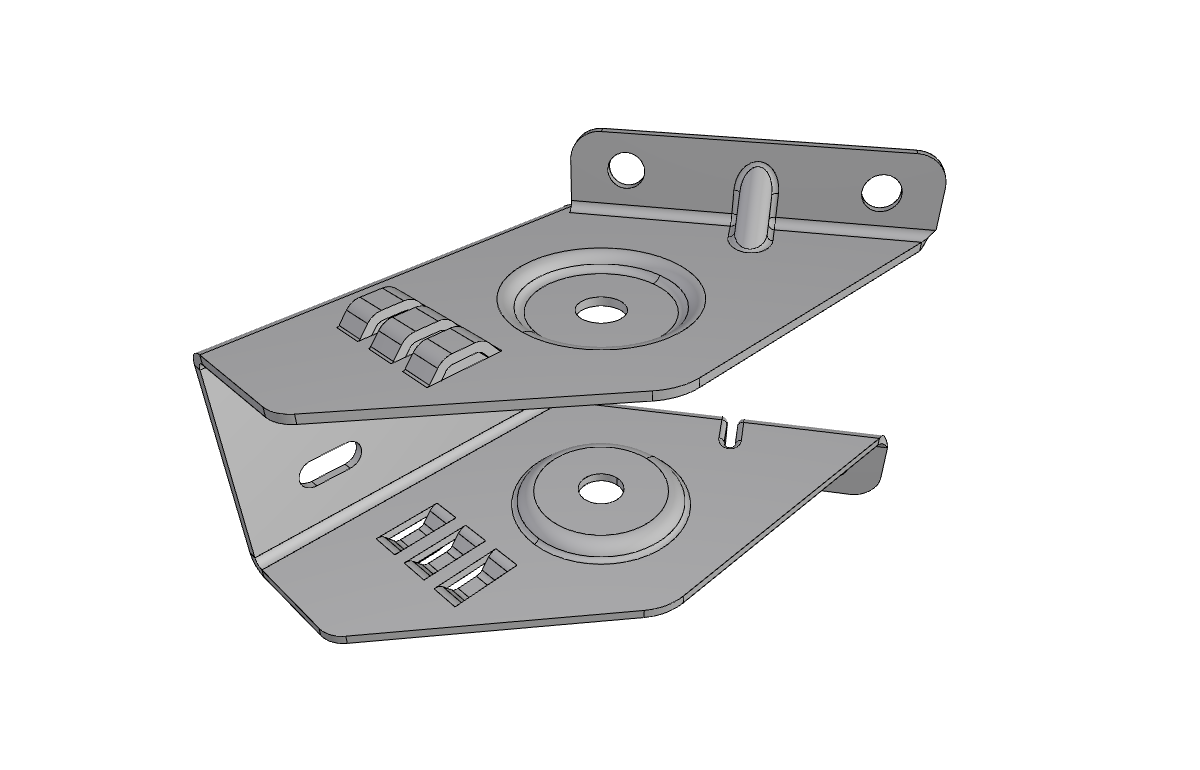
Recognize sheet metal parts by identifying main faces and thickness faces.
Note
Prerequisites: Attributed Adjacency Graph (AAG)
Tip
Tutorial Data File: lances-sheet-metal.step
Sheet Metal Recognition#
This module provides tools to recognize and analyze sheet metal parts from BRep (Boundary Representation) models. It uses the Attributed Adjacency Graph (AAG) to identify main faces (the two sides of the sheet) and thickness faces (the edges connecting them), enabling automatic feature extraction.
Reference: This implementation is based on the methodology described in Yang Yang et al. (2021) for automatic sheet metal feature recognition.
Overview#
Sheet metal parts are characterized by:
Two main face groups: The top and bottom surfaces of the sheet
Thickness faces: The thin faces connecting the two main surfaces
Features: Bends, corners, notches, reliefs, and other manufacturing features
The recognition process:
Finds the largest face as a seed face
Propagates through smooth angles to identify the first main face group
Finds the largest remaining face as the opposite face
Propagates to identify the second main face group
Remaining faces are classified as thickness faces
Validates the sheet metal structure
Quick Start#
from volmdlr.model import VolumeModel
from volmdlr_tools.shapes.recognizers import SheetMetalRecognizer
from volmdlr_tools.features.extractors import SheetMetalFeatureExtractor

# Load a STEP file
volume_model = VolumeModel.from_step("data/step/lances-sheet-metal.step")
shape = volume_model.primitives[0]

# Recognize sheet metal shape
recognizer = SheetMetalRecognizer(shape=shape)

if recognizer.perform():
    # Get the sheet metal abstraction
    sheet_metal = recognizer.result

    # Access properties
    print(f"Boundary thickness faces: {len(sheet_metal.boundary_chain)}")
    print(f"Internal features: {len(sheet_metal.internal_chains)}")

    # Get thickness shell for visualization
    boundary_shell = sheet_metal.get_boundary_thickness_shell()
Core Classes#
SheetMetalRecognizer#
The main entry point for sheet metal recognition. It analyzes a BRep shape to determine if it’s a sheet metal part and classifies its faces.
Constructor#
SheetMetalRecognizer(
    shape: Union[shapes.Shell, shapes.Solid],
    aag: Optional[AttributedAdjacencyGraph] = None,
    name: str = ""
)
Parameters:
shape: The BRep shape to analyze (Shell or Solid)aag: (Optional) Pre-computed AttributedAdjacencyGraphname: (Optional) Name for the recognizer instance
Properties#
Property |
Type |
Description |
|---|---|---|
|
|
The recognized sheet metal abstraction |
|
|
Face IDs of main faces (both sides) |
|
|
Face IDs of thickness faces |
|
|
The largest face used as starting point |
|
|
The largest face on the opposite side |
|
|
First main face group (one side) |
|
|
Second main face group (other side) |
Methods#
perform() -> bool: Execute the recognition algorithm. ReturnsTrueif the shape is valid sheet metal.
Example#
from volmdlr_tools.shapes.recognizers import SheetMetalRecognizer

recognizer = SheetMetalRecognizer(shape=my_shape)

if recognizer.perform():
    print(f"Main faces: {len(recognizer.main_faces)}")
    print(f"Thickness faces: {len(recognizer.thickness_faces)}")

    # Access the shape abstraction
    sheet_metal = recognizer.result
else:
    print("Not a valid sheet metal part")
SheetMetalShape#
The shape abstraction representing a recognized sheet metal part. Provides access to geometric properties and feature extraction.
Properties#
Property |
Type |
Description |
|---|---|---|
|
|
The perimeter thickness faces |
|
|
Internal thickness face chains (holes, cutouts) |
|
|
The sheet metal thickness |
Key Methods#
get_boundary_thickness_shell() -> shapes.Shell: Returns the perimeter thickness faces as a shell for visualizationget_internal_thickness_shells() -> list[shapes.Shell]: Returns internal features as shells
Example#
# After recognition
sheet_metal = recognizer.result

# Get the boundary (perimeter) as a shell
boundary_shell = sheet_metal.get_boundary_thickness_shell()
boundary_shell.color = (1.0, 0.0, 0.0)  # Red

# Get internal features
internal_shells = sheet_metal.get_internal_thickness_shells()
for shell in internal_shells:
    shell.color = (0.0, 1.0, 0.0)  # Green

# Visualize
from volmdlr.model import VolumeModel
VolumeModel([my_shape, boundary_shell, *internal_shells]).babylonjs()
ThicknessFaceChain#
Represents a connected chain of thickness faces. According to Yang Yang et al., thickness face chains are the fundamental building blocks for sheet metal feature recognition.
Constructor#
ThicknessFaceChain(
    face_ids: list[int],
    aag: AttributedAdjacencyGraph,
    is_closed: bool = True,
    is_internal_chain: bool = False,
    is_fsf_neighbor: bool = False,
    name: Optional[str] = None
)
Properties#
Property |
Type |
Description |
|---|---|---|
|
|
Ordered list of face IDs in the chain |
|
|
Whether the chain forms a closed loop |
|
|
Whether this is an internal chain |
|
|
Whether adjacent to a fan-shaped face |
|
|
Face adjacency relationships |
|
|
Calculated thickness value |
|
|
Shell representation of the chain |
Key Methods#
get_fan_shaped_faces() -> list[FanShapedFace]: Identify fan-shaped faces (used for bend detection)get_fan_shaped_pairs(max_angle: float) -> list[tuple]: Get paired fan-shaped facesget_concave_subchains() -> list[ThicknessFaceChain]: Extract concave angle subchainsget_convex_subchains() -> list[ThicknessFaceChain]: Extract convex angle subchainsextract_fsf_subchains() -> list[ThicknessFaceChain]: Extract fan-shaped-face bounded subchains
Example#
# Work with the boundary chain
boundary = sheet_metal.boundary_chain

print(f"Chain length: {len(boundary)} faces")
print(f"Is closed: {boundary.is_closed}")

# Find fan-shaped faces (bends)
fan_faces = boundary.get_fan_shaped_faces()
print(f"Found {len(fan_faces)} fan-shaped faces")

# Get face adjacency
for face_id, neighbors in boundary.adjacency_map.items():
    print(f"Face {face_id} neighbors: {neighbors}")
FanShapedFace#
Represents a fan-shaped thickness face used in bend detection. A fan-shaped face is planar with two concentric circular edges and two straight thickness edges.
Attributes#
Attribute |
Type |
Description |
|---|---|---|
|
|
The face ID in the AAG |
|
|
The inner circular edge |
|
|
The outer circular edge |
|
|
The two straight edges |
|
|
Center point of the concentric arcs |
|
|
Arc angle in radians |
|
|
Paired face for bend detection |
Methods#
can_pair_with(other, aag) -> bool: Check if two fan-shaped faces can form a bend pair
TFCGroup#
Groups related thickness face chains for feature classification.
Key Methods#
extract_cut_feature_properties() -> dict: Extract properties for cut feature classificationextract_composite_feature_properties() -> dict: Extract properties for composite feature classification (bends, jogs)
Utility Functions#
are_faces_parallel(face1, face2, tolerance=1e-6) -> bool#
Check if two faces are geometrically parallel.
from volmdlr_tools.shapes.sheet_metal import are_faces_parallel

if are_faces_parallel(face1, face2):
    print("Faces are parallel")
get_face_normal(face) -> Vector3D#
Extract the normal vector from a planar face.
from volmdlr_tools.shapes.sheet_metal import get_face_normal

normal = get_face_normal(my_face)
print(f"Normal: {normal}")
order_nodes_by_graph(nodes, subgraph) -> list[int]#
Order nodes according to their connectivity in a graph.
from volmdlr_tools.shapes.sheet_metal import order_nodes_by_graph

ordered = order_nodes_by_graph(face_ids, subgraph)
See Also#
AAG (Attributed Adjacency Graph) - Understanding the graph representation
Sheet Metal Features - Feature types and extraction
Feature Recognition Module - General feature recognition
See Also#
Attributed Adjacency Graph (AAG) - Attributed Adjacency Graph
Sheet Metal Features - Sheet metal feature extraction
Swept Shapes - Swept shape recognition