
GraphAssembly#
GraphAssembly provides graph-based representation and analysis of CAD assemblies. Nodes represent shapes (solids), and edges capture relationships like distance, contact, and geometric constraints.
Note
Prerequisites: Graph Fundamentals
Tip
Tutorial Data File: test.stp
GraphAssembly#
User documentation for the GraphAssembly class of the graph.assembly module of the volmdlr_tools library
What is it?#
GraphAssembly is a class from a submodule of the volmdlr_tools library. The goal of this module is to create graphs from a geometric structure and to use it a base structure to:
Add metadata to the CAD
On the edge linking CAD elements
On the nodes representing CAD elements
Extract sub-graph / specific nodes / specific edges base on filters
Save already computed information on the graph in a serializable object
The class GraphAssembly is:
as generic as possible
provide base methods to manipulate is
inherits from the class
Graphand specify some CAD-assembly dedicated methods
Base functionalities#
Custom typings#
NodeID = int
Attributes = dict[str, Any]
Node = tuple[NodeID, Attributes]
Edge = tuple[NodeID, NodeID]
Class attributes#
graph: networkx.GraphThe network graph of the assemblyroot_compound: CompoundThe root compound of the assembly, optional.
Properties#
nodes: networkx.NodeViewA getter of the nodes of the graph that provide access to their attributes. Usedata=Trueargument to get aNodeDataViewto also get the attributes.edges: networkx.EdgeViewA getter of the edges of the graph that provide access to their attributes. Usedata=Trueargument to get aEdgeDataViewto also get the attributes.
Instantiation#
A GraphAssembly object can instantiate from a VolumeModel or from a Compound
For now, it is made to work with VolumeModel with an unique Compound as a root primitive, which are the type of VolumeModel we have when load a CAD file (STEP or native geometry).
# From a volmdlr.model.VolumeModel
@classmethod
def from_volume_model(cls, volume_model: VolumeModel) -> "GraphAssembly":

# From a volmdlr.shapes.Compound
@classmethod
def from_compound(cls, compound: Compound) -> "GraphAssembly":

# From a networkx.Graph
@classmethod
def from_networkx_graph(cls, graph: nx.Graph) -> "Graph":
Default nodes attributes#
At the instantiation with from_volume_model or from_compound class methods, the nodes have default attributes:
name: The name of the corresponding geometry elements (extracted from the VolumeModel)level: The deep level of the corresponding geometry element (in the assembly tree)class: The class of the corresponding geometry element.color: The color of the corresponding geometry element, in a plot_data way.shape: The shape used for plotting with plot_data.primitive_id: The ID of the corresponding geometry element, to retrieve the geometry from the node.location: The location (translation and rotation) of the corresponding geometry element.
Basic getters#
Several methods are made to extract information from the GraphAssemby object
# Get the number of nodes of the graph.
@property
def n_nodes(self) -> int:

# Get the number of edges of the graph.
@property
def n_edges(self) -> int:

# Create the networkx graph from the object attributes.
def network_graph(self) -> nx.Graph:

# Get a specific attribute of a specific Node.
def get_node_attribute(self, node: NodeID, attribute: str) -> Any:

# Get a specific attribute of a specific Edge.
def get_edge_attribute(self, edge: Edge, attribute: str) -> Any:

# Get the Shape (i.e. the geometry) that corresponds to a specific node.
def get_shape(self, node_id: NodeID) -> Shape:
Also, the __getitem__ method is set to access the node or edge attributes:
def __getitem__(self, item: Union[NodeID, Edge]) -> Attributes:

# Example usage
graph: GraphAssembly  # graph is a GraphAssembly instance

# NODE
graph[1]  # Return all the attributes of node with id 1
graph.nodes[1]  # Equivalent

graph[1]["name"]  # Return the value of attribute "name" of the node with id 1
graph.get_node_attribute(1, "name")  # Equivalent, except there is a None default
																		 # value if attribute does not exist

# EDGE
graph[(1, 2)]  # Return all the attribute of the Edge between node 1 and 2
graph.edges[(1, 2)]  # Equivalent

graph[(1, 2)]["distance"]  # Return the value of attribute "distance" of the edge (1, 2)
graph.get_edge_attribute((1, 2), "distance")  # Equivalent, but with None default value
Plotting#
The graph can be plotted with plot data
def plot_data(self, reference_path: str = "#", **kwargs) -> list[plot_graph.NetworkxGraph]:

# Example usage
graph: GraphAssembly  # graph is a GraphAssembly instance
graph.plot()
Example plot
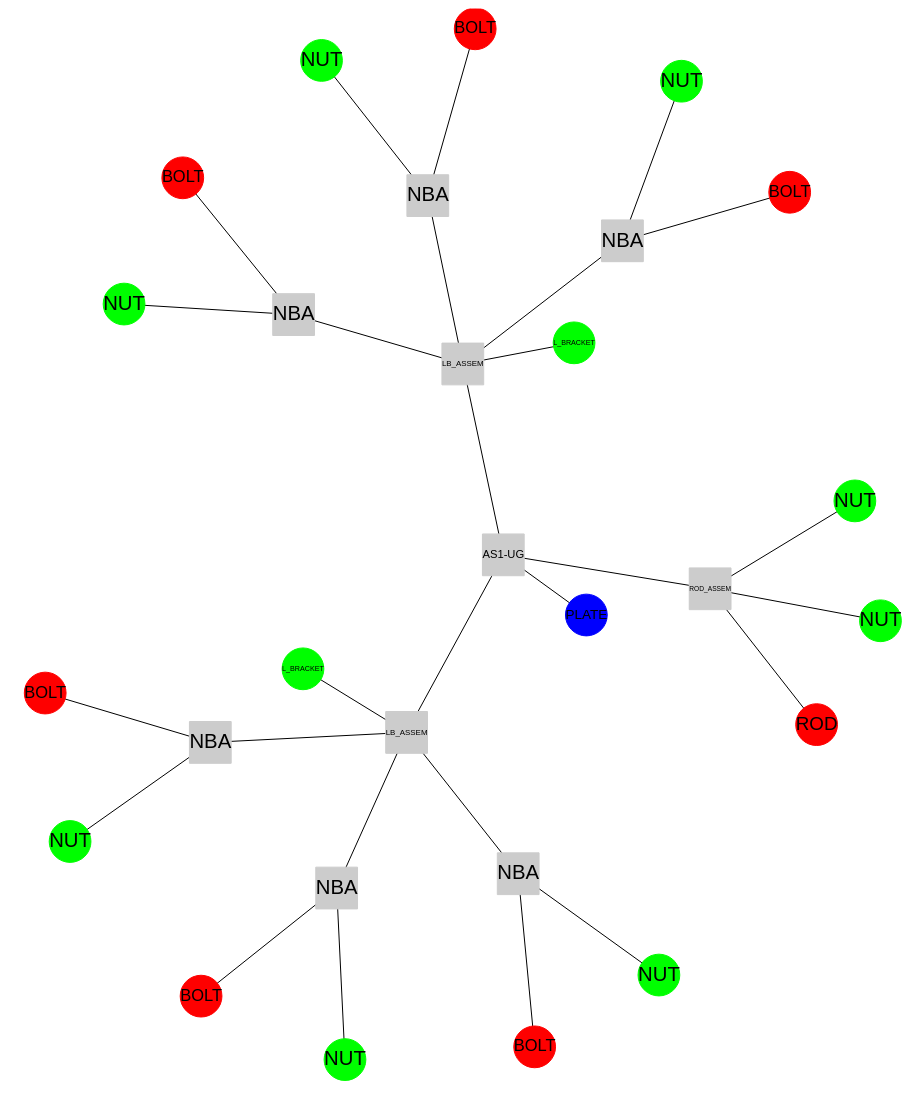
Corresponds to this
VolumeModel: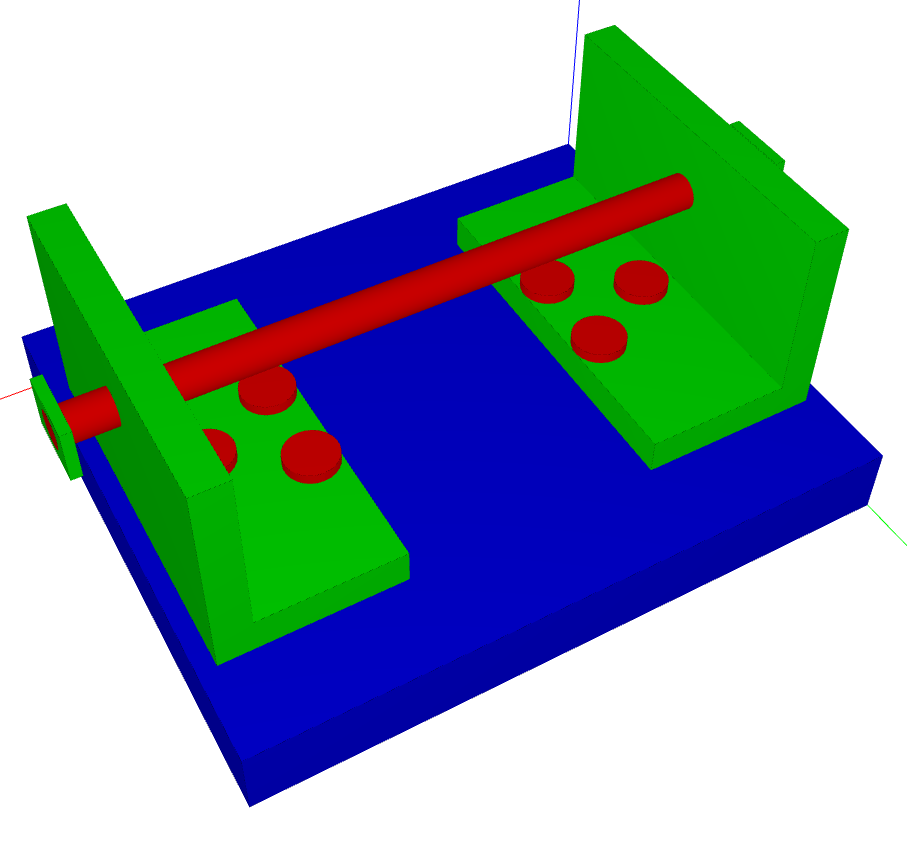
Basic setters#
Like basic getters, several methods allow setting attribute on specific node / edge:
# Set a specific attribute on a specific node.
def set_node_attribute(self, node: NodeID, attribute: str, value: Any) -> None:

# Set a specific attribute on a specific edge.
def set_edge_attribute(self, edge: Edge, attribute: str, value: Any) -> None:

# Create an edge with given attributes, if not already existing.
def create_edge(self, edge: Edge, attributes: Attributes = None) -> None:
Advanced functionalities#
We have seen how to get or set attributes on specific nodes / edges directly by passing the value. Now we will see how to:
set attributes dynamically computed on specific filtered nodes / edges
Example: set the distance between all solids of the graph
extract specific nodes / edges based on a given filter
Example: extract all the solids at less than 10mm from a specific solid of the graph
The is made possible by passing callable as methods arguments.
These have to be methods or functions that take a NodeID or an Edge (depending on the case) as argument and that compute a value (for attribute setting) or a bool (for filtering).
The typing is always specified (expected argument of the callable and expected return type) in methods that expect such argument.
The different typings are:
# A callable that take a NodeID and return a value (for attribute setting).
Callable[[NodeID], Any]

# A callable that take an Edge and return a value (for attribute setting).
Callable[[Edge], Any]

# A callable that take a NodeID and return a bool (for filtering).
Callable[[NodeID], bool]

# A callable that take an Edge and return a bool (for filtering).
Callable[[Edge], bool]
Advanced getters#
These getters can extract edges / nodes based on a filtering function.
# Get all the nodes that satisfy the filter_function (all by default)
def get_nodes(
    self, filter_function: Callable[[NodeID], bool] = lambda node: True
) -> NodesMap:

# Get all the edges that satisfy the filter_function (all by default)
def get_edges(
    self, filter_function: Callable[[Edge], bool] = lambda edge: True
) -> EdgesMap:
Advanced setters#
These setters can set dynamically computed attribute on filtered edges or nodes
# Set a dynamically computed attribute on all the nodes that satisfy the filter_function
def set_nodes_attribute(
    self,
    attribute: str,
    attribute_function: Callable[[NodeID], Any],
    filter_function: Optional[Callable[[NodeID], bool]] = None,
) -> None:

# Set a dynamically computed attribute on all the edges that satisfy the filter_function
def set_edges_attribute(
    self,
    attribute: str,
    attribute_function: Callable[[Edge], Any],
    filter_function: Optional[Callable[[Edge], bool]] = None,
) -> None:

# Create an edge between all the node that satisfy a filter_function
def create_edges(self, filter_function: Optional[Callable[[Edge], bool]]) -> None:
Creating edge is mandatory because it is not possible to set attributes on node that does not exist.
Extract#
Some methods allow extracting data a different way from getters methods
# Extract the neighbors of given node
def neighbors(
		self, node: NodeID, filter_function: Callable[[Edge], bool] = lambda edge: True
) -> NodesMap:

# Extract a subgraph with all the node that fulfill the filter function
def subgraph(self, filter_function: Callable[[NodeID], bool]) -> "Graph":
Specific methods for common usage#
Some specific methods have been implemented:
For commonly use metadata
As good example of the class usage
def set_bounding_box_attribute(self) -> None:
    """Set the bounding box attribute for all nodes."""
    self.set_nodes_attribute(
        "bounding_box", lambda node: self.get_shape(node).bounding_box
    )
def set_distance_attribute(self) -> None:
    """Set the distance attribute between all solids."""
    # Create an edge between all solids
    self.create_edges(
        filter_function=lambda edge: self[edge[0]]["class"] == "Solid"
        and self[edge[1]]["class"] == "Solid"
    )

    # Set the distance attribute
    self.set_edges_attribute(
        attribute="distance",
        attribute_function=lambda edge: self.get_shape(edge[0]).distance(
            self.get_shape(edge[1])
        ),
        filter_function=lambda edge: self[edge[0]]["class"] == "Solid"
        and self[edge[1]]["class"] == "Solid",
    )
def set_connection_geometry(self, tol: float = 1e-9) -> None:
    """
    Set the connection geometry attribute for all solids. The edge attribute "connection" will be set.

    :param tol: The tolerance to consider two solids as connected.
    """
    # Create an edge between all solids
    self.create_edges(
        filter_function=lambda edge: self[edge[0]]["class"] == "Solid"
        and self[edge[1]]["class"] == "Solid"
    )

    # Set the distance attribute if not already set
    self.set_edges_attribute(
        attribute="distance",
        attribute_function=lambda edge: self.get_shape(edge[0]).distance(
            self.get_shape(edge[1])
        ),
        filter_function=lambda edge: self[edge].get("distance") is None
        and self[edge[0]]["class"] == "Solid"
        and self[edge[1]]["class"] == "Solid",
    )

    def connection_geometry(edge: Edge) -> list[Shape]:
        """Compute the connection geometry between two solids."""
        solid1 = self.get_shape(edge[0])
        solid2 = self.get_shape(edge[1])

        connections = []
        for shell1 in solid1.primitives:
            for shell2 in solid2.primitives:
                connections.extend(shell1.intersection(shell2, tol=tol))

        return connections

    # Set the connection geometry attribute
    self.set_edges_attribute(
        attribute="connection",
        attribute_function=connection_geometry,
        filter_function=lambda edge: self[edge].get("distance", 1e9) <= tol
        and self[edge[0]]["class"] == "Solid"
        and self[edge[1]]["class"] == "Solid",
    )
def get_close_solids(
    self, solid_node_id: NodeID, maximum_distance: float
) -> NodesMap:
    """
    Get the close solids from a solid.

    :param solid_node_id: The node id of the solid.
    :param maximum_distance: The maximum distance to consider a solid as close.

    :return: A dict of the close solids with their attributes.
    """
    # Check if it's a solid
    if self[solid_node_id]["class"] != "Solid":
        raise ValueError("Provided node id does not correspond to a Solid.")

    # Create the edges between the solid and the other
    self.create_edges(
        filter_function=lambda edge: solid_node_id in edge
        and self[edge[0]]["class"] == "Solid"
        and self[edge[1]]["class"] == "Solid"
    )

    # Compute the distance on these edges
    self.set_edges_attribute(
        attribute="distance",
        attribute_function=lambda edge: self.get_shape(edge[0]).distance(
            self.get_shape(edge[1])
        ),
        filter_function=lambda edge: solid_node_id in edge
        and self[edge[0]]["class"] == "Solid"
        and self[edge[1]]["class"] == "Solid",
    )

    # Return the neighbors base on the distance
    return self.neighbors(
        solid_node_id,
        lambda edge: self[edge].get("distance", 1e9) < maximum_distance,
    )
Rules check examples#
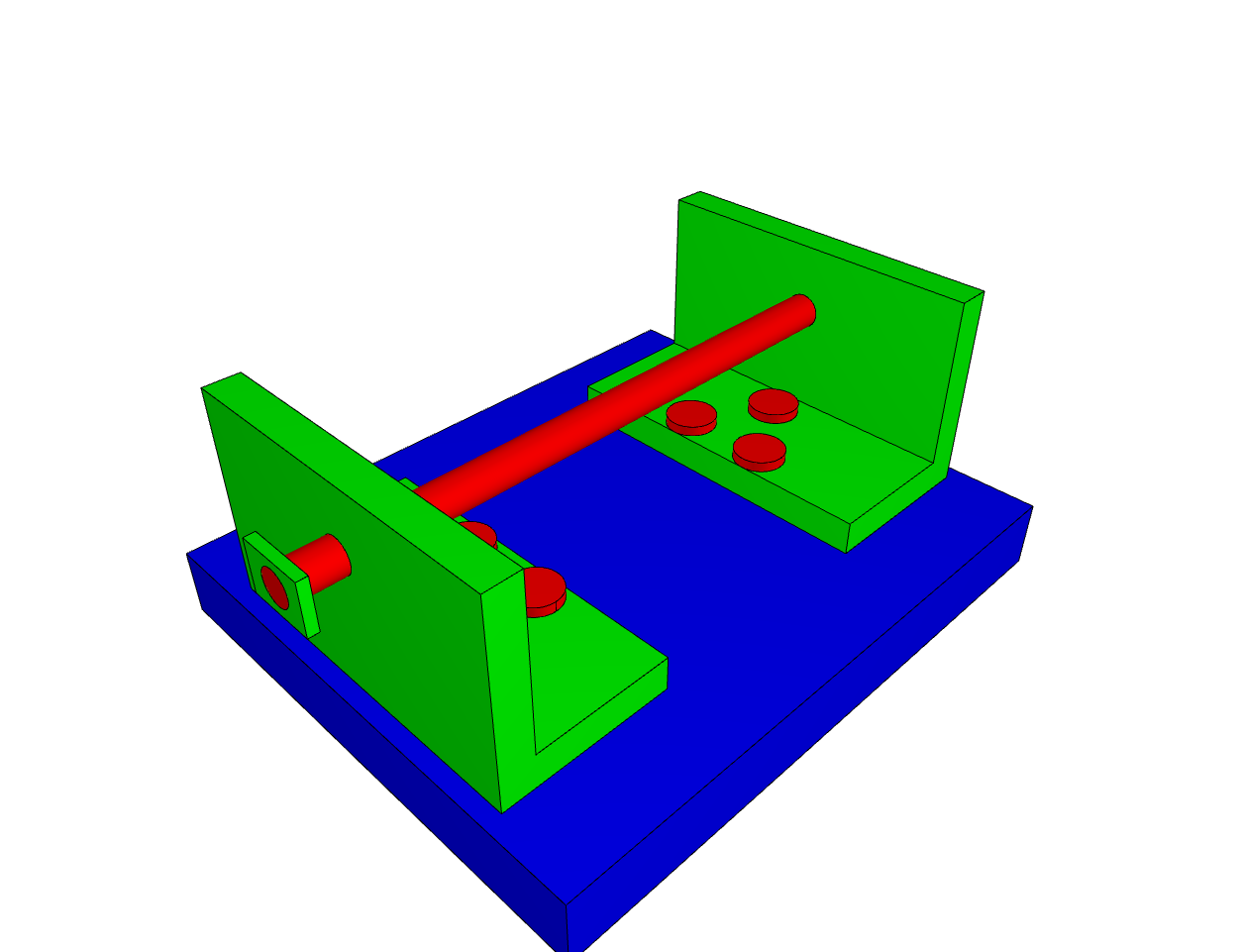
Some scripts in the library shows how to use the class to check specific rules, on the following geometry:
1_position_rule.py: Check that all the nuts are under the plate2_distance_rule.py: Check if the bolts are at a minimum distance between each other3_connection_rule.py: Check that the rod is only connected to other solid with “Cylindrical” connection4_proximity_rule.py: The ROD should not have more than 4 solids at a given distance, and the plate should not be part of it
The key in checking rules is:
Having a way to identify the involved components
Having a way to compute a data that allow verifying the rule
Example Script#
Full working script using GraphAssembly:
 1"""Script to showcase the volmdlr_tools.graph.assembly module."""
 2
 3import math
 4from pathlib import Path
 5from time import perf_counter
 6
 7from volmdlr.model import VolumeModel
 8
 9from volmdlr_tools.graph.assembly import GraphAssembly
10
11STEP_FILE = Path(__file__).absolute().parent.parent.parent.parent / "data" / "step" / "test.stp"
12
13# DEFINING OBJECTS
14# Define a VolumeModel from a STEP file
15volume_model = VolumeModel.from_step(str(STEP_FILE))
16
17# Plot the VolumeModel
18volume_model.display_3d()
19
20# Define a GraphAssembly from the VolumeModel
21graph = GraphAssembly.from_volume_model(volume_model)
22
23# Plot the GraphAssembly
24graph.plot_graph().plot()
25
26# Print the GraphAssembly
27graph.print_tree()
28
29# SETTING METADATA
30# Set bounding box attribute for Solid nodes
31graph.set_bounding_box_attribute()
32
33t_start = perf_counter()
34# Set the minimum distance between Solid nodes
35graph.set_distance_attribute()
36t_end = perf_counter()
37exact_distances = {
38    edge: graph[edge].get("distance")
39    for edge in graph.edges
40    if graph[edge[0]]["class"] == "Solid" and graph[edge[1]]["class"] == "Solid"
41}
42print(f"Time to calculate all distances using exact method: {t_end - t_start} s")
43
44t_start = perf_counter()
45# Set the approximated minimum distance between Solid nodes
46graph.set_distance_attribute(exact=False)
47t_end = perf_counter()
48print(f"Time to calculate all distances using approximated method: {t_end - t_start} s")
49for edge in graph.edges:
50    if graph[edge[0]]["class"] == "Solid" and graph[edge[1]]["class"] == "Solid":
51        print("graph[edge].get(distance): ", graph[edge].get("distance"))
52        print("exact_distances[edge]: ", exact_distances[edge])
53        assert math.isclose(graph[edge].get("distance"), exact_distances[edge], abs_tol=0.005)
54
55# Set the connection between solids nodes
56graph.set_connection_geometry()
57
58# EXTRACTING DATA
59# Extract all the solids near the solid named "PLATE"
60solids = graph.get_close_solids(solid_node_id=1, maximum_distance=0.1)
61
62# SERIALIZE
63graph.save_export_to_file(selector="json", filepath="graph.json")
64
65# DESERIALIZE
66graph2 = GraphAssembly.from_json("graph.json")
67# assert graph == graph2
See Also#
Graph Fundamentals - Base graph concepts
Attributed Adjacency Graph (AAG) - Face-level adjacency graphs
Kinematics & Determinacy - Kinematic analysis using GraphAssembly