
Feature-Vertex Graph (FVG)#
The Feature-Vertex Graph (FVG) is a signed graph derived from the Attributed Adjacency Graph. Its nodes are feature vertices and its edges are the signed (concave/convex) model edges, each carrying its vexity and the faces on either side. It complements the face-based AAG by reasoning over boundary vertices and edges, and it is the foundation for boundary-segmentation work.
Note
Prerequisites: Graph Fundamentals, Attributed Adjacency Graph (AAG)
Note
Download the model used in the examples below:
three_cylinders.step
Feature-Vertex Graph (FVG)#
Overview#
The Feature-Vertex Graph (FVG) is a signed graph derived from an Attributed Adjacency Graph (AAG). Where the AAG has faces as nodes, the FVG has feature vertices as nodes and signed model edges as graph edges:
Nodes are geometric vertices that lie on at least one signed (non-smooth) edge.
Edges are the model edges that carry a concave or convex sign (including their tangent variants). Each edge records its vexity and the two faces on either side of it.
The motivation is complementary to the AAG. Boolean operations (union, subtraction, blending) merge and split faces, so the final face set drifts away from the original design features. Edges and vertices — the intersection records of those operations — survive much better, which makes a vertex/edge graph a robust place to reason about feature boundaries. The FVG is the foundation for boundary-segmentation work; cycles in the graph correspond to closed feature-boundary loops.
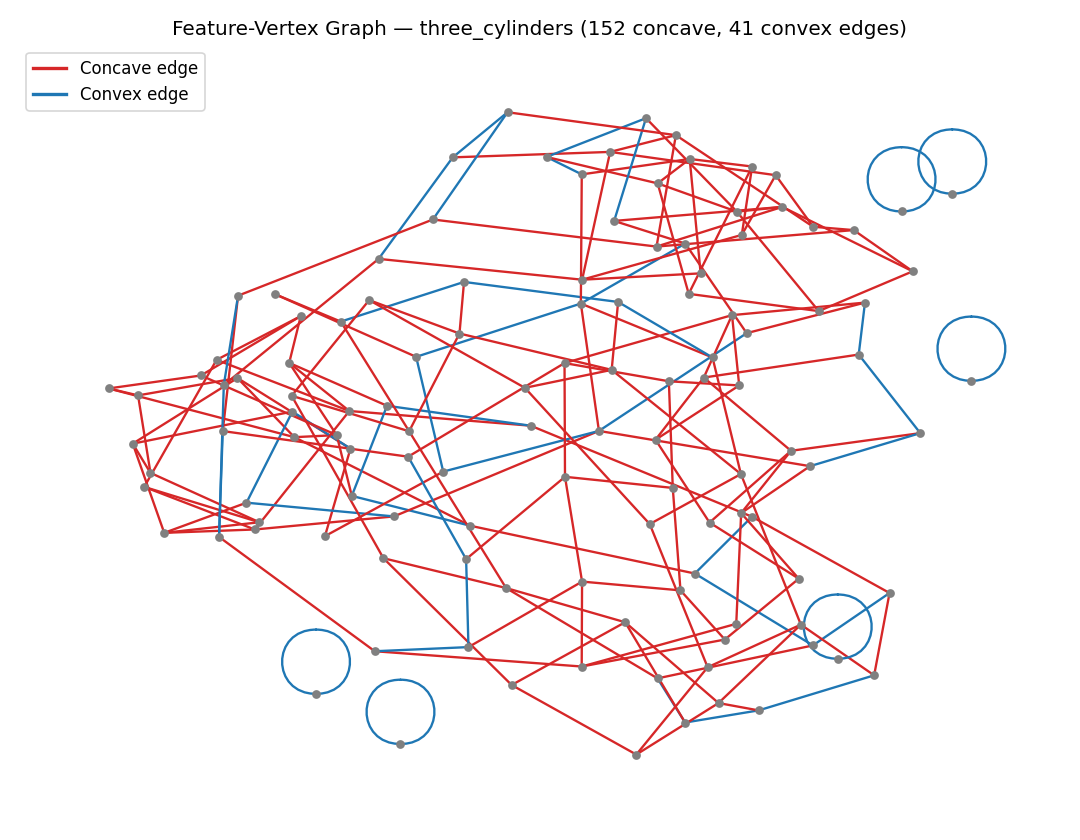
The figure below is the FVG of the three_cylinders part. Red edges are concave, blue
edges are convex. The small rings around the periphery are closed feature-boundary
loops — for example the circular cap rims of the cylinders.
Building an FVG#
An FVG is built from an AAG with face angles already computed. It is a pure, derived view of the AAG: it stores only indices (vertices, edges, faces) and the derived vexity, never geometry, and it keeps no reference back to the AAG.
from volmdlr.model import VolumeModel

from volmdlr_tools.graph.faces import AttributedAdjacencyGraph
from volmdlr_tools.graph.feature_vertex_graph import FeatureVertexGraph

solid = VolumeModel.from_step("data/step/three_cylinders.step").primitives[0]

aag = AttributedAdjacencyGraph(solid)
aag.calculate_faces_angles()

fvg = FeatureVertexGraph.from_aag(aag)

print(fvg.n_nodes)               # number of feature vertices
print(len(fvg.edges))            # number of signed model edges
print(fvg.feature_vertex_indices)  # the set of vertex indices that are nodes
The graph is backed by a networkx multigraph keyed by model-edge index, so parallel
edges (two arcs between the same vertices) and closed edges (a full circle becomes a
self-loop) are all preserved.
Edge attributes#
Every FVG edge carries the following attributes (all indices are 0-based):
Attribute |
Meaning |
|---|---|
|
The model edge’s index (also the multigraph key). |
|
A |
|
The adjacent face on which the edge runs in its forward direction. |
|
The adjacent face on the reverse side. |
|
|
for start, end, data in fvg.edges(data=True):
    print(start, end, data["vexity"], data["left_face_id"], data["right_face_id"])
The left_face_id / right_face_id orientation comes from the edge’s forward/reverse
sense on each face (material lies to the left of an edge running in its forward
direction), so the FVG already carries the directional information needed for boundary
tracing.
Sign-filtered views#
Because protrusion and depression boundaries differ in sign, the FVG offers sign-filtered
views. Each view is a fresh, standalone FeatureVertexGraph containing only the
matching edges (and their incident nodes); building a view never mutates the original.
concave = fvg.concave_view()   # CONCAVE + SMOOTH_CONCAVE edges
convex = fvg.convex_view()     # CONVEX + SMOOTH_CONVEX edges

# A general predicate over edge data is also available:
sharp_concave = fvg.filter_edges(lambda data: data["vexity"].name == "CONCAVE")
Together the concave and convex views partition the full edge set, so they are a natural starting point for separating protrusion boundaries from depression boundaries.
Which edges enter the graph#
The FVG keeps only signed edges — the family
{CONCAVE, CONVEX, SMOOTH_CONCAVE, SMOOTH_CONVEX}. Two consequences are worth knowing:
Smooth edges are intentionally excluded. A purely tangent (
SMOOTH) join carries no concave/convex sign and is not a feature boundary, so it is dropped — by design, and is not reported as a failure.Un-placeable edges are tallied, never silently dropped. Edges that cannot be placed (degenerate, open-boundary, seam, or non-manifold) are recorded in
skipped_edgeswith a reason, so nothing disappears unexplained.
print(fvg.skipped_edges) # e.g. [(12, "boundary_or_seam"), ...]
Note
Which near-tangent edges enter the graph depends on the AAG’s allow_smooth setting.
With allow_smooth=True (the default), edges that sit exactly at the tangent boundary
are classified as plain SMOOTH and excluded. Building the AAG with
allow_smooth=False forces those near-tangent edges to resolve to SMOOTH_CONCAVE /
SMOOTH_CONVEX instead, so they enter the FVG. Choose the setting that matches whether
you consider tangent joins to be feature boundaries.
Relationship to the AAG#
The FVG is a derived snapshot — the AAG remains the single source of truth for face and edge topology. Because the FVG holds only indices, it answers questions about topology, vexity, and which faces an edge separates; for geometry (a vertex’s 3D point or the actual edge), pair the FVG with its AAG:
point = aag.get_vertex(vertex_index)            # 3D point of an FVG node
left, right = aag.get_oriented_faces_thru_edge(edge_index)  # the edge's left/right faces
The graph is serializable like any other graph in the package
(to_dict / dict_to_object round-trips the structure, edge vexities, and the
skipped_edges tally).
Visualizing an FVG#
A ready-made demonstration script renders an FVG on the 3D part — the model edges are thickened into vexity-colored tubes (red concave, blue convex) over a semi-transparent solid, with separate views for the full graph and the concave/convex slices:
python scripts/graph/feature_vertex_graph_demo.py
The 2D node-link figure shown above is the abstract graph view of the same data.
See Also#
Attributed Adjacency Graph (AAG) - The face-based graph the FVG is derived from
Graph Fundamentals - Base graph concepts (serialization, views, filtering)
Feature Recognition - Feature detection built on the AAG