ViewTitle Guide#
from pathlib import Path
from dessia_drawing.core import Drawing
from drawing_tools.config.default_language_configs import DEFAULT_ENGLISH_CONFIG, DEFAULT_FRENCH_CONFIG
from drawing_tools.config.view_types_config import ViewType, VIEW_TYPE_GROUPS
from drawing_tools.featured_drawing import FeaturedDrawing
from drawing_tools.view.featured_view import FeaturedView

_DATA_DIR = Path("data/json")
_LANGUAGE_CONFIGS = [DEFAULT_FRENCH_CONFIG, DEFAULT_ENGLISH_CONFIG]
drawing = Drawing.from_json(str(_DATA_DIR / "2902060102_--A_DEF01_LH SUPPORT ACCUMULATOR ASSEMBLY.json"))
featured_drawing = FeaturedDrawing(drawing, language_configs=_LANGUAGE_CONFIGS)
featured_sheet = featured_drawing.sheets[1]
featured_view = featured_sheet.views[2]
# Find first view with a title for examples
view_title = None
for _s in featured_drawing.sheets:
    for _v in _s.views:
        if _v.title is not None:
            featured_view = _v
            view_title = _v.title
            break
    if view_title is not None:
        break
featured_view.plot_data_title_view().plot()
The ViewTitle class is a powerful tool for parsing and extracting structured information from view title symbols in technical drawings. It provides multi-language support and extracts various pieces of information including view names, types, identifiers, scales, and repetition values.
See also
For a complete working example demonstrating all ViewTitle features, see the script
scripts/view_titles.py in the repository.
Overview#
A ViewTitle object represents a parsed view title symbol from a technical drawing. It analyzes both the structural aspects (text lines, styles, positions) and semantic content (view name, scale, repetitions) of title symbols.
The class automatically:
Groups text elements into lines based on their vertical position
Parses information in multiple languages
Extracts view names, types, identifiers, scales, and repetition values
Provides convenient access to both language-specific and unified values
Each FeaturedView object has a title property that - if a title is detected - contains a ViewTitle allowing to easily access the parsed information.
Below is an example of a raw view title and python properties extracted from it using the view title parser.
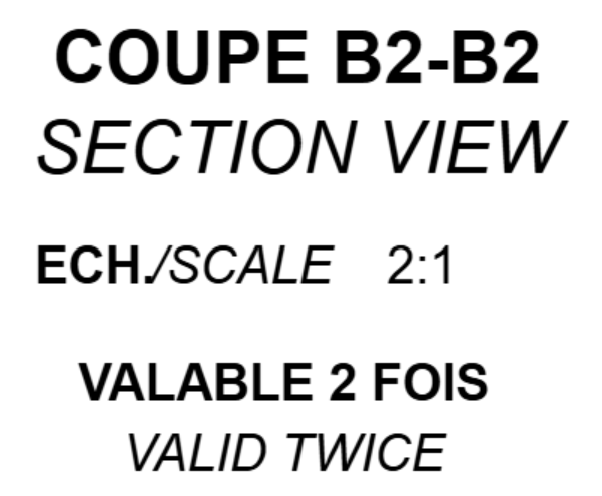
Figure 3: First example of a raw view title.#
featured_view.title.view_name_by_language["french"].name -> "COUPE B2-B2"
featured_view.title.view_name_by_language["english"].name -> "SECTION VIEW"


featured_view.title.scale_by_language["english"].value -> 2.0
featured_view.title.scale_by_language["french"].value -> 2.0
featured_view.title.scale() -> 2.0

featured_view.title.view_type_by_language["french"].type -> ViewType.SECTION_VIEW
featured_view.title.view_type_by_language["english"].type -> ViewType.SECTION_VIEW
featured_view.title.view_type() -> ViewType.SECTION_VIEW

featured_view.title.repetition_by_language["french"].value -> 2
featured_view.title.repetition_by_language["english"].value -> 2
featured_view.title.repetition() -> 2

featured_view.title.identifiers_by_language["french"].label -> "COUPE"
featured_view.title.identifiers_by_language["french"].section_line_identifier -> "B2-B2"
featured_view.title.identifiers_by_language["french"].identifier -> "B2"
featured_view.title.identifiers_by_language["french"].letter -> "B"
featured_view.title.identifiers_by_language["french"].number -> 2
featured_view.title.identifiers_by_language["english"].label -> "SECTION VIEW"
featured_view.title.identifiers_by_language["english"].identifier -> None
The following interactive visualization shows the title overlay on COUPE B2-B2 with
all parsed attributes grouped by language (type, name, scale, repetition on a single
line per field with / separators, then identifiers per language).
Use featured_view.plot_data_title_view().plot() to generate this view.
This method is also available on FeaturedSheet (all views at once) and
FeaturedDrawing (all sheets).
Source: 2902060102_–A_DEF01_LH SUPPORT ACCUMULATOR ASSEMBLY.json, Sheet 1, View 4
Another example, also showing how to access the text style of the lines.

Figure 4: Second example of a raw view title.#
view_name_by_language = featured_view.title.view_name_by_language

view_name_by_language["french"].name -> "VUE DE FACE"
view_name_by_language["french"].text_line.texts[0].text_style.font_style -> "BOLD"
view_name_by_language["french"].text_line.texts[0].text_style.font_name -> "Arial"
view_name_by_language["french"].text_line.texts[0].text_style.char_height -> 10.0

view_name_by_language["english"].name -> "FRONT VIEW"
view_name_by_language["english"].text_line.texts[0].text_style.font_style -> "ITALIC"
view_name_by_language["english"].text_line.texts[0].text_style.font_name -> "Arial"
view_name_by_language["english"].text_line.texts[0].text_style.char_height -> 10.0

featured_view.title.scale_by_language["french"].value -> None
Being able to easily catch such properties drastically accelerates the implementation of checks on drawings.
The following interactive visualization shows the title overlay on VUE DE FACE:
Source: 2902060102_–A_DEF01_LH SUPPORT ACCUMULATOR ASSEMBLY.json, Sheet 1, View 2
See Display & Report Methods for more interactive examples.
Creating a ViewTitle#
A ViewTitle is typically created automatically when accessing the title property of a FeaturedView:
from drawing_tools import FeaturedView
from drawing_tools.config.default_language_configs import DEFAULT_ENGLISH_CONFIG, DEFAULT_FRENCH_CONFIG
from dessia_drawing.core import View

# Assuming you have a View object and language configs
view = View(...)
language_configs = [DEFAULT_ENGLISH_CONFIG, DEFAULT_FRENCH_CONFIG]

featured_view = FeaturedView(view, language_configs=language_configs)
view_title = featured_view.title  # Returns a ViewTitle object
You can also create a ViewTitle directly from a title symbol entity:
from drawing_tools.view.title_reader import ViewTitle
from dessia_drawing.base import Entity

# Assuming you have a title symbol entity
title_symbol = Entity(...)  # Usually a Symbol containing text
language_configs = [DEFAULT_ENGLISH_CONFIG, DEFAULT_FRENCH_CONFIG]

view_title = ViewTitle(
    source_entity=title_symbol,
    language_configs=language_configs
)
Basic Properties#
Text Structure#
The ViewTitle class provides several properties to access the raw text structure:
# Get all text lines (grouped by y-coordinate)
text_lines = view_title.text_lines

# Get text content as a list of strings
lines_content = view_title.lines_content
# Example: ["VUE DE FACE", "ECH: 1:1"]

# Get the number of text lines
line_count = view_title.line_count

# Check if title has multiple lines
has_multiple = view_title.has_multiple_lines

# Get all text as a single string
raw_text = view_title.get_raw_text()
# Example: "VUE DE FACE\nECH: 1:1"
Each text_line object contains not only the text content but also formatting information
(font name, font style, character height, color, etc.). See Text Style Extraction for details.
Language Detection#
The ViewTitle automatically detects which languages are present in the title:
detected_languages = view_title.detected_languages
# Example: ["french", "english"]
See Language Configuration Guide for details on configuring language detection.
Extracted Information#
The ViewTitle extracts several types of information, organized by language:
View Names#
View names are extracted for each configured language:
# Get view names organized by language
view_names = view_title.view_name_by_language
# Example: {
#     "french": ViewNameInfo(name="VUE DE FACE", text_line=...),
#     "english": ViewNameInfo(name="FRONT VIEW", text_line=...)
# }
ViewNameInfo provides:
- name: the extracted name string
- text_line: source line with formatting
- is_empty: boolean indicating if the view name is empty
View Types#
View types are automatically detected from the view name:
from drawing_tools.config.view_types_config import ViewType

# Get view types organized by language
view_types = view_title.view_type_by_language
# Example: {
#     "french": ViewTypeInfo(type=ViewType.FRONT_VIEW),
#     "english": ViewTypeInfo(type=ViewType.FRONT_VIEW)
# }

# Get unified view type (requires all languages to agree)
view_type = view_title.view_type()
# Returns: ViewType.FRONT_VIEW or None

# Get view type for a specific language
view_type_french = view_title.view_type(dominant_language="french")
# Returns: ViewType.FRONT_VIEW or None
ViewTypeInfo provides:
type: the detectedViewTypeenum valueis_empty: boolean indicating if no type was detected
View Type Groups#
Related view types are organized into groups via VIEW_TYPE_GROUPS. This allows treating
variants of the same conceptual view type together when writing rules or filters.
Available groups:
“section”:
SECTION_VIEW,SECTION_CUT,LEVELED_SECTION_VIEW,TYP_SECTION_VIEW,TYP_SECTION_CUT“auxiliary”:
AUXILIARY_VIEW,ROTATED_VIEW_ON“front”:
FRONT_VIEW,FRONT_VIEW_HC“top”:
TOP_VIEW,TOP_VIEW_HC
Checking group membership:
from drawing_tools.config.view_types_config import ViewType, VIEW_TYPE_GROUPS

# get_group() returns all members of the same group, or a singleton if ungrouped
ViewType.get_group(ViewType.SECTION_CUT)
# → [SECTION_VIEW, SECTION_CUT, LEVELED_SECTION_VIEW, TYP_SECTION_VIEW, TYP_SECTION_CUT]

ViewType.get_group(ViewType.DETAIL_VIEW)
# → [ViewType.DETAIL_VIEW]  (ungrouped → singleton)
Filtering views by group (e.g., collecting all section-like views from a drawing):
from drawing_tools.config.view_types_config import VIEW_TYPE_GROUPS

section_group = VIEW_TYPE_GROUPS["section"]

for sheet in featured_drawing.sheets:
    for view in sheet.views:
        if view.title and view.title.view_type() in section_group:
            print(view.title.get_raw_text())
See scripts/view_titles.py (Part 2) for a complete working example with group
inspection, filtering, and classification.
Section View vs Section Cut: SECTION_VIEW (FR: “COUPE”, EN: “SECTION VIEW”) shows the
cut surface plus elements behind the cutting plane, while SECTION_CUT (FR: “SECTION”,
EN: “SECTION CUT”) shows only the cut surface itself.
Identifiers#
Identifiers (like “A2”, “B2-B2”) are extracted from view names:
# Get identifiers organized by language
identifiers = view_title.identifiers_by_language
# Example: {
#     "french": IdentifierInfo(
#         letter="B",
#         number=2,
#         identifier="B2",
#         section_line_identifier="B2-B2",
#         label="COUPE"
#     )
# }
The following image illustrates identifier definitions on 3 different view titles.
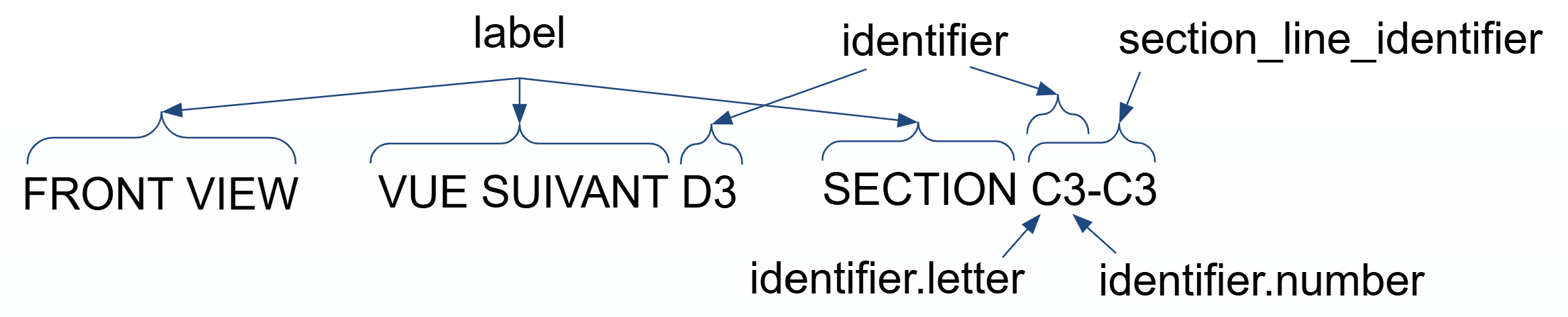
Figure 5: Identifiers extracted from a view title.#
IdentifierInfo provides:
letter: the letter part (e.g., “B”)number: the numeric part (e.g., 2)identifier: combined identifier (e.g., “B2”)section_line_identifier: full section line notation (e.g., “B2-B2”) in case of section viewslabel: the view label keyword (e.g., “COUPE”)is_empty: boolean indicating if no identifier was found
Scales#
Scale information is extracted from text lines:
# Get scales organized by language
scales = view_title.scale_by_language
# Example: {
#     "french": ScaleInfo(value=2.0, text="2:1", text_line=TextLine(...)),
#     "english": ScaleInfo(value=2.0, text="2:1", text_line=TextLine(...))
# }

# Get unified scale value (requires all languages to agree)
scale = view_title.scale()
# Returns: 2.0 or None

# Get scale for a specific language
scale_french = view_title.scale(dominant_language="french")
# Returns: 2.0 or None
ScaleInfo provides:
value: the scale as a float (e.g., 2.0 for scale 2:1)text: the extracted scale text (e.g., “2:1”)text_line: source line with formattingis_empty: boolean indicating if no scale was found
Repetitions#
Repetition values (e.g., “VALABLE 2 FOIS”) are extracted:
# Get repetitions organized by language
repetitions = view_title.repetition_by_language
# Example: {
#     "french": RepetitionInfo(value=2, text_line=TextLine(...))
# }

# Get unified repetition value
repetition = view_title.repetition()
# Returns: 2 or None

# Get repetition for a specific language
repetition_french = view_title.repetition(dominant_language="french")
# Returns: 2 or None
RepetitionInfo provides:
value: the repetition count as an integertext_line: source line with formattingis_empty: boolean indicating if no repetition was found
Additional Text Lines#
Any text lines that don’t match known patterns are available as additional information:
additional_lines = view_title.additional_text_lines
# Returns: List of TextLine objects that weren't categorized
# Example: [TextLine(content="Additional note")]
Unified Values vs Language-Specific Values#
The ViewTitle class provides two ways to access extracted information:
Language-specific access: Access information for each language separately
Unified access: Get a single value that must be consistent across all languages
Unified Access#
When you call methods like title.view_type(), title.scale(), or title.repetition() without a dominant_language parameter, the method requires that all configured languages agree on the value. If different languages have different values, an assertion error is raised:
# This will raise an error if French and English detect different view types
view_type = view_title.view_type()

# This will raise an error if different scale values are found
scale = view_title.scale()
If all languages agree on the value and no error is raised, it lightens the code.
Language-Specific Access#
To get values for a specific language, the unified access methods can be used with the dominant_language parameter:
# Get view type for French only
view_type_french = view_title.view_type(dominant_language="french")

# Get scale for English only
scale_english = view_title.scale(dominant_language="english")
This is another way of accessing:
# Get view type for French only
view_type_french = view_title.view_type_by_language["french"].type

# Get scale for English only
scale_english = view_title.scale_by_language["english"].value
Text Style Extraction#
Each text line in a ViewTitle provides access to text style information through the
text_style_extractor property. This is useful for validating formatting rules.
Accessing Text Styles#
# Get the first text line
text_line = view_title.text_lines[0]

# Access the dominant text style
dominant_style = text_line.text_style_extractor.dominant_text_style

# Available style properties
print(f"Font name: {dominant_style.font_name}")
print(f"Font style: {dominant_style.font_style}")
print(f"Character height: {dominant_style.char_height}")
print(f"Color: {dominant_style.color}")

# Additional text line properties
print(f"X span: {text_line.x_span}")
Report & Summary#
The ViewTitle class provides a report() method (decorated with @markdown_view) that generates a markdown report of all parsed information. summary() is an alias for report().
# Markdown report (also available as @markdown_view on the platform)
report_text = view_title.report()
print(report_text)

# Alias
summary_text = view_title.summary()
This report includes:
Raw text data with formatting information (font, style, height, color)
Processed data organized by language: * View names * View types * Scales * Repetitions * Identifiers * Additional text lines
The report is useful for debugging and understanding what information was extracted from the title.
Title Visualization#
The ViewTitle class provides a plot_data_primitives() method that generates colored text labels
for overlaying title identification information on a view plot.
The FeaturedView, FeaturedSheet, and FeaturedDrawing classes each provide a
plot_data_title_view() method that combines the base 2D view with these title labels:
# View level — single view with title labels
featured_view.plot_data_title_view().plot()

# Sheet level — all views with color-coded title labels
featured_sheet.plot_data_title_view().plot()

# Drawing level — MultiplePlots, one per sheet
featured_drawing.plot_data_title_view().plot()
See scripts/view_titles.py (Step 3) for a complete working example.