Featured Classes Guide#
from pathlib import Path
from dessia_drawing.core import Drawing
from drawing_tools.config.default_language_configs import DEFAULT_ENGLISH_CONFIG, DEFAULT_FRENCH_CONFIG
from drawing_tools.config.view_types_config import ViewType
from drawing_tools.featured_drawing import FeaturedDrawing
from drawing_tools.sheet import FeaturedSheet
from drawing_tools.view.featured_view import FeaturedView

_DATA_DIR = Path("data/json")
drawing = Drawing.from_json(str(_DATA_DIR / "2902060102_--A_DEF01_LH SUPPORT ACCUMULATOR ASSEMBLY.json"))
featured_drawing = FeaturedDrawing(drawing, language_configs=[DEFAULT_FRENCH_CONFIG, DEFAULT_ENGLISH_CONFIG])
featured_sheet = featured_drawing.sheets[1]
featured_view = featured_sheet.views[2]
Drawing Tools provides three main wrapper classes that enrich their dessia_drawing counterparts
with additional features and semantic analysis capabilities.
Overview#
The wrapper pattern used by Drawing Tools allows you to:
Access all original
dessia_drawingattributes and methodsGain new features like view title parsing, type detection, and filtering
Work with enriched objects that automatically wrap their children
dessia_drawing              drawing_tools
─────────────               ─────────────
Drawing        ──────►    FeaturedDrawing
  │                        │
  └── Sheet     ──────►    └── FeaturedSheet
       │                        │
       └── View   ──────►       └── FeaturedView
The hierarchical structure of the wrapper classes follows the hierarchical structure of the original dessia_drawing objects.
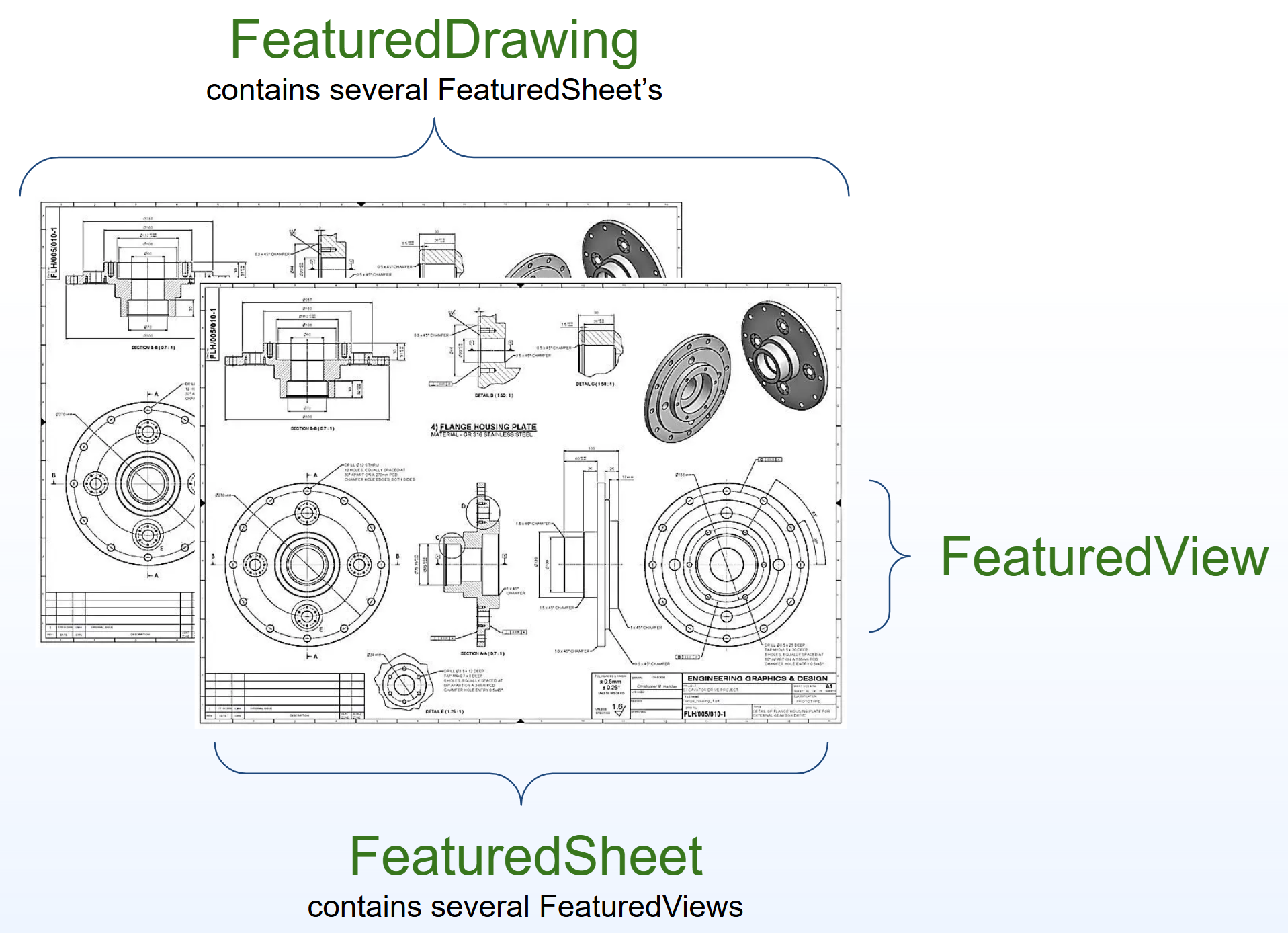
Figure 2: Hierarchical structure of drawing_tools wrapper classes.#
Layers#
The CAD layer model lives entirely in dessia_drawing (read-only). The wrappers expose its
display API by delegation: set selected_layer_ids on any Featured* (written through to the
wrapped object) and render the selection with plot_data_layers() — also available on the
platform through the “Layers” selector. The rest of the model (layer_infos,
get_filter_layer_ids, layer_of, …) is reached through the same attribute delegation.
featured_sheet.selected_layer_ids = featured_drawing.get_filter_layer_ids("Geometry pack")
featured_sheet.plot_data_layers()   # combined render of the selected layers
See also
For the full layer model, selection semantics, filters (check sets) and rendering details,
see the Layers guide in the dessia_drawing documentation.
FeaturedDrawing#
FeaturedDrawing wraps a dessia_drawing.Drawing and provides access to enriched sheets
with parsed view titles and semantic analysis.
See also
For a complete working example, see scripts/script_featured_drawing.py.
Creating a FeaturedDrawing#
from dessia_drawing.core import Drawing
from drawing_tools.config.default_language_configs import DEFAULT_ENGLISH_CONFIG, DEFAULT_FRENCH_CONFIG
from drawing_tools.featured_drawing import FeaturedDrawing

# Load a drawing from JSON
drawing = Drawing.from_json("path/to/drawing.json")

# Create featured drawing with language configurations
featured_drawing = FeaturedDrawing(
    drawing,
    language_configs=[DEFAULT_FRENCH_CONFIG, DEFAULT_ENGLISH_CONFIG]
)
See Language Configuration Guide for details on how to configure language configuration(s).
Summary and Information#
Get a comprehensive summary of the drawing:
# Print drawing summary
print(featured_drawing.summary())

# Access sheets (returns FeaturedSheet objects)
for i, featured_sheet in enumerate(featured_drawing.sheets):
    print(f"Sheet {i + 1}: {len(featured_sheet.views)} views")
Accessing Original Attributes#
All original Drawing attributes are accessible through delegation:
# These are equivalent:
featured_drawing.name           # Delegated access
featured_drawing.drawing.name  # Direct access to wrapped object
Visualizing View Indexes#
FeaturedDrawing and FeaturedSheet provide a plot_data_view_indexes() method
that overlays each view with a colored rectangle and its sheet/view index label (e.g., S1 V2).
This is useful for quickly identifying views in a drawing:
# Visualize all sheets with view indexes
featured_drawing.plot_data_view_indexes().plot()

# Or a single sheet
featured_drawing.sheets[1].plot_data_view_indexes().plot()
FeaturedDrawing provides many other @plot_data_view methods (plot_data_balloons,
plot_data_tables, plot_data_section_lines, plot_data_sets, etc.), each returning a
MultiplePlots with one plot per sheet. See Display & Report Methods for the complete
list with interactive examples.
Filtering Views by Type#
FeaturedDrawing provides convenient methods to filter views across all sheets:
from drawing_tools.config.view_types_config import ViewType

# Get all section views from the entire drawing
section_views = featured_drawing.views_of_types([ViewType.SECTION_VIEW])

# Get multiple view types at once
views = featured_drawing.views_of_types([
    ViewType.FRONT_VIEW,
    ViewType.SECTION_VIEW,
    ViewType.DETAIL_VIEW
])

for view in views:
    print(f"{view.name}: {view.type}")
Using the Collector#
FeaturedDrawing exposes a collector attribute that provides access to a dessia_drawing.DrawingCollector.
The latter simply uses a dessia_drawing.SheetCollector on all sheets in the drawing and aggregates results, allowing you to collect entities by type and by text across the entire drawing:
# Collect all entities of type dimension in the drawing
dimensions = featured_drawing.collector.type.dimensions().entities

# Collect all entities of type symbol by subtype (e.g., balloons)
balloons = featured_drawing.collector.type.symbols(
    entity_subtypes=["TypeBalloon"]
).entities

# Collect entities containing specific text
entities_with_vue = featured_drawing.collector.text.search("VUE")
entities_with_coupe = featured_drawing.collector.text.search("COUPE")
For complete documentation on the collector API, refer to the User Guide / Collecting Module section
in the dessia_drawing documentation.
FeaturedSheet#
FeaturedSheet wraps a dessia_drawing.Sheet and provides enriched access to views
with type detection and filtering capabilities.
See also
For a complete working example, see scripts/script_featured_sheet.py.
Creating a FeaturedSheet#
from dessia_drawing.core import Drawing
from drawing_tools.config.default_language_configs import DEFAULT_ENGLISH_CONFIG, DEFAULT_FRENCH_CONFIG
from drawing_tools.sheet import FeaturedSheet

drawing = Drawing.from_json("path/to/drawing.json")
sheet = drawing.sheets[0]

# Create featured sheet with language configurations
featured_sheet = FeaturedSheet(
    sheet,
    language_configs=[DEFAULT_ENGLISH_CONFIG, DEFAULT_FRENCH_CONFIG]
)
In practice, creating a FeaturedSheet by this way is not needed as FeaturedDrawing automatically creates featured sheets for all sheets in the drawing.
Accessing Original Attributes#
All original Sheet attributes are accessible through delegation:
# These are equivalent:
featured_sheet.name           # Delegated access
featured_sheet.sheet.name    # Direct access to wrapped object
Listing Views and Their Types#
# List all views with their detected types
for featured_view in featured_sheet.views:
    print(f"{featured_view.name} - {featured_view.type}")
Filtering Views by Type#
from drawing_tools.config.view_types_config import ViewType

# Get views of a single type
section_views = featured_sheet.views_of_type(ViewType.SECTION_VIEW)
for view in section_views:
    print(f"Section view: {view.name}")

# Get views of multiple types
view_types = [ViewType.FRONT_VIEW, ViewType.SECTION_VIEW]
filtered_views = featured_sheet.views_of_types(view_types)

# Get views sorted by reading order (top-to-bottom, left-to-right)
sorted_views = featured_sheet.views_of_types_by_reading_order(view_types)
Iterating Over All View Types#
from drawing_tools.config.view_types_config import ViewType

for view_type in ViewType.all_types():
    views = featured_sheet.views_of_type(view_type)
    if views:
        print(f"{view_type.value}:")
        for view in views:
            print(f"    {view.name}")
Using the Collector#
FeaturedSheet exposes a collector attribute that provides access to a dessia_drawing.SheetCollector.
The latter simply uses a dessia_drawing.ViewCollector on all views of the sheet and aggregates results in a dedicated object,
allowing you to collect entities by type and by text within the sheet:
# Collect all entities of type dimension in the sheet
dimensions = featured_sheet.collector.type.dimensions().entities

# Collect all symbols in the sheet
symbols = featured_sheet.collector.type.symbols().entities

# Collect entities containing specific text
entities_with_text = featured_sheet.collector.text.search("COUPE")
For complete documentation on the collector API, refer to the User Guide / Collecting Module section
in the dessia_drawing documentation.
Visualization#
FeaturedSheet provides @plot_data_view methods for visualizing various analyses.
Each returns a PrimitiveGroup:
featured_sheet.plot_data_view().plot()              # Base 2D rendering
featured_sheet.plot_data_view_indexes().plot()      # View index labels
featured_sheet.plot_data_grid_reference().plot()    # ISO 5457 grid overlay
featured_sheet.plot_data_title_view().plot()        # Parsed title overlays
featured_sheet.plot_data_balloons().plot()          # Balloon groups & labels
featured_sheet.plot_data_tables().plot()            # Detected tables
featured_sheet.plot_data_sets().plot()              # Detected set regions
featured_sheet.plot_data_section_lines().plot()     # Section line indicators
featured_sheet.plot_data_dimensions().plot()              # Dimension labels (multi-color)
featured_sheet.plot_data_geometrical_tolerances().plot()  # Geometrical tolerance overlays (green)
featured_sheet.plot_data_roughness().plot()               # Roughness overlays (blue)
See Display & Report Methods for the complete list with interactive examples.
FeaturedView#
FeaturedView wraps a dessia_drawing.View and provides parsed title information
with multi-language support.
See also
For a complete working example, see scripts/script_featured_view.py.
Creating a FeaturedView#
from dessia_drawing.core import Drawing
from drawing_tools.config.default_language_configs import DEFAULT_ENGLISH_CONFIG, DEFAULT_FRENCH_CONFIG
from drawing_tools.view.featured_view import FeaturedView

drawing = Drawing.from_json("path/to/drawing.json")
sheet = drawing.sheets[0]
view = sheet[0]  # Get first view

# Create featured view with language configurations
featured_view = FeaturedView(
    view,
    language_configs=[DEFAULT_ENGLISH_CONFIG, DEFAULT_FRENCH_CONFIG]
)
In practice, creating a FeaturedView by this way is not needed as FeaturedSheet automatically creates featured views for all views in the sheet.
Accessing Original Attributes#
All original View attributes are accessible through delegation:
# These are equivalent:
featured_view.scale           # Delegated access
featured_view.view.scale     # Direct access to wrapped object

# Other delegated attributes
print(featured_view.name)
print(featured_view.type)
print(featured_view.annotations)
Working with View Titles#
The title property provides access to parsed title information.
For complete documentation on view title parsing, including language-specific access,
text structure, and all available properties, see ViewTitle Guide.
A few examples are given below.
if featured_view.title: # Tip: always check for title existence before accessing title properties

    # Get view name by language
    print(featured_view.title.view_name_by_language["english"].name)
    print(featured_view.title.view_name_by_language["french"].name)

    # Get view type by language
    print(featured_view.title.view_type_by_language["english"].type)
    print(featured_view.title.view_type_by_language["french"].type)
    print(featured_view.title.view_type()) # works only if all languages agree

    # Get scale and identifiers
    print(featured_view.title.scale_by_language["english"].value)
    print(featured_view.title.identifiers_by_language["french"].identifier)

    # Full title summary for debugging
    print(featured_view.title.summary())
Note
Some properties exist in both the original dessia_drawing.View (from Datakit) and in the parsed title:
Property |
From Datakit (delegated) |
From title parsing |
|---|---|---|
Name |
|
|
Type |
|
|
Scale |
|
|
Differences between these sources are expected:
Scale: Both values should match. Verifying consistency can be useful for quality checks.
Name: The
Viewobject provides a single name, while title parsing extracts names for each configured language.Type: Datakit recognizes a limited set of view types, whereas the title parser can detect additional types based on language-specific keywords.
Using the Collector#
FeaturedView exposes a collector attribute that provides access to a dessia_drawing.ViewCollector.
This allows you to collect entities by type and by text within the view:
# Collect annotations by type
dimensions = featured_view.collector.annotations.type.dimensions()

# Collect geometries by type
line_segments = featured_view.collector.geometries.type.line_segments()

# Collect entities containing specific text
entities_with_text = featured_view.collector.annotations.text.search("M8")
For complete documentation on the collector API, refer to the User Guide / Collecting Module section
in the dessia_drawing documentation.
Visualization#
FeaturedView provides @plot_data_view methods for single-view visualizations.
Each returns a PrimitiveGroup:
featured_view.plot_data_view().plot()                          # Base 2D rendering
featured_view.plot_data_title_view().plot()                    # Parsed title overlay
featured_view.plot_data_balloons().plot()                      # Balloon groups
featured_view.plot_data_section_lines().plot()                 # Section line indicators
featured_view.plot_data_auxiliary_view_indicators().plot()      # Auxiliary view references
featured_view.plot_data_all_identifiers().plot()               # All identifiers combined
featured_view.plot_data_dimensions().plot()                    # Dimension labels (multi-color)
featured_view.plot_data_geometrical_tolerances().plot()        # Geometrical tolerance overlays (green)
featured_view.plot_data_roughness().plot()                     # Roughness overlays (blue)
See Display & Report Methods for the complete list with interactive examples.