Electrical Bonding Symbols#
from pathlib import Path
from dessia_drawing.core import Drawing
from drawing_tools.config.default_language_configs import DEFAULT_ENGLISH_CONFIG, DEFAULT_FRENCH_CONFIG
from drawing_tools.featured_drawing import FeaturedDrawing

_DATA_DIR = Path("data/json")
_LANGUAGE_CONFIGS = [DEFAULT_FRENCH_CONFIG, DEFAULT_ENGLISH_CONFIG]

beam_drawing = Drawing.from_json(str(_DATA_DIR / "condor/condor_BEAM_ASSY.json"))
beam = FeaturedDrawing(beam_drawing, language_configs=_LANGUAGE_CONFIGS)
featured_sheet = beam.sheets[2]

formation_drawing = Drawing.from_json(
    str(_DATA_DIR / "condor/condor_TEMP_332P641283_--A_DRW01_FORMATION_LIGHT_ASSY.json")
)
formation = FeaturedDrawing(formation_drawing, language_configs=_LANGUAGE_CONFIGS)
featured_sheet.plot_data_bonding_symbols().plot()
An electrical bonding symbol requires a metal-to-metal electrical continuity between the parts it designates. It is the subject of the bonding table rule of the drawing standard: the title block carries a METALLISATION / ELEC. BONDING table whose TYPE column lists the bonding types used on the drawing, and the symbols on the views are what that table refers to.
See also
For a complete working example, see the script scripts/detect_bonding_symbols.py
in the repository.
What is a Bonding Symbol?#
It looks like a balloon — a circle with a number beside it — but it carries the earth/ground glyph instead of an item number: a circle enclosing one vertical bar and three horizontal bars of decreasing length, with the bonding type written next to it.
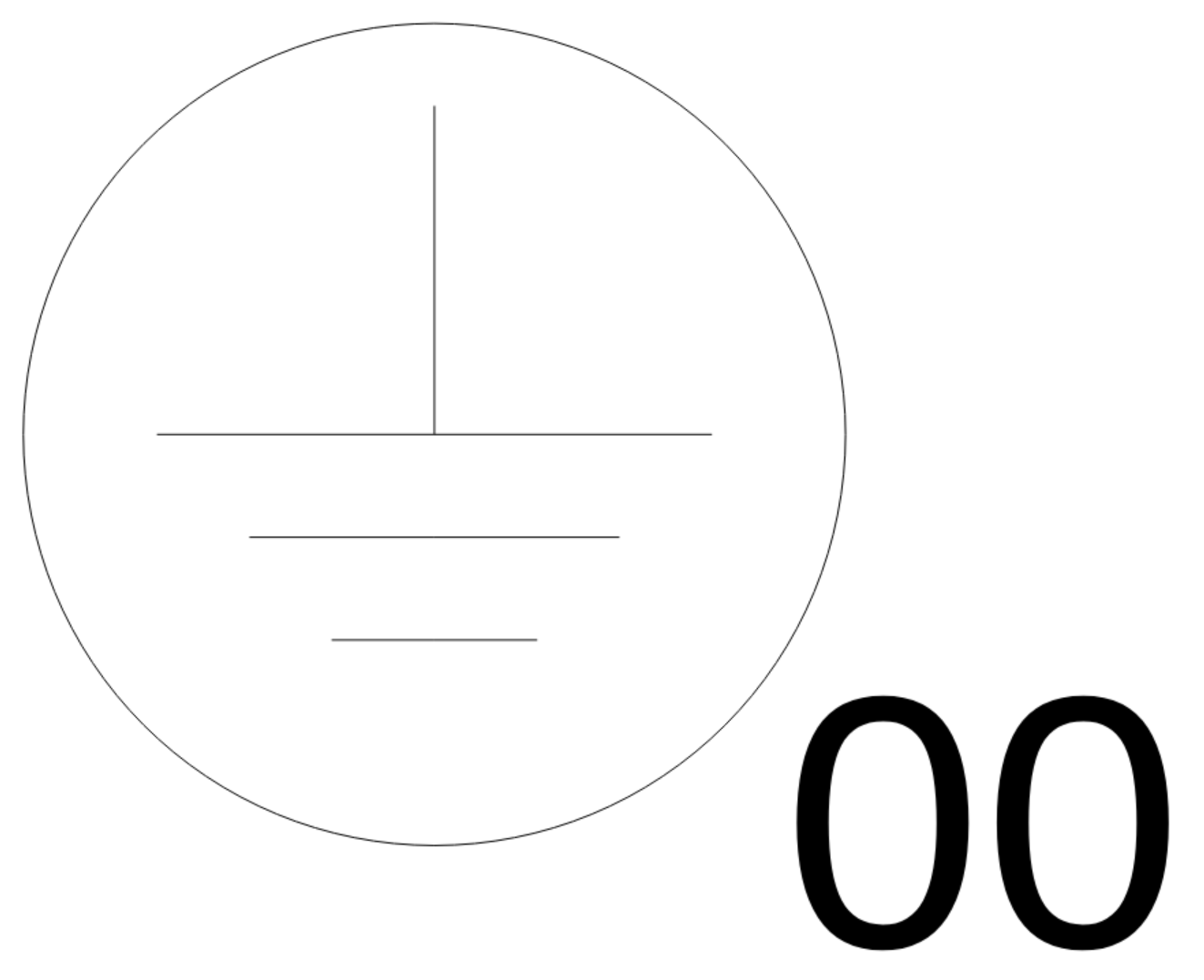
Figure 1: a bonding symbol as drawn on a sheet — the circle with its vertical bar
and three horizontal bars, and the label 00 beside it, which is its bonding
TYPE.#
That geometry is exactly what the detector matches, and the three bars are counted: it is what tells a bonding symbol apart from any other circled glyph on the sheet.
A bonding symbol never stands alone. It always comes with:
a label — the number beside the circle (
label), which is its bonding type, not an identifier: several symbols of a drawing carry the same label without being related to each other (four10symbols is the normal case, not a duplication error);leaders, in one of two ways: either its own leader arrows, or a group of one or several balloons carrying the leaders it borrows. Those leaders are what the API gives you — what they point at on the drawing is not resolved into entities.
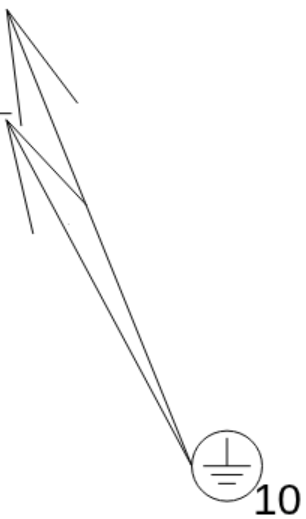
Figure 2: bonding 10 with two leader arrows of its own, each pointing at an
entity to be bonded — leader_count == 2.#
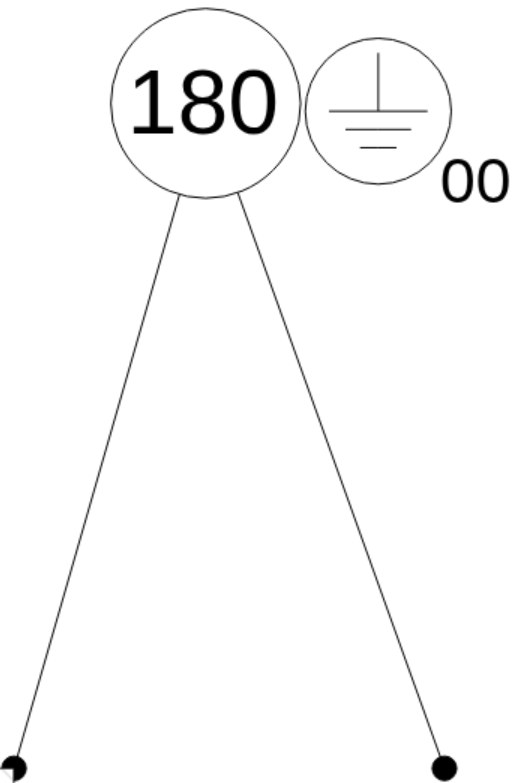
Figure 3: bonding 00 carries no arrow of its own: it is drawn against balloon
180, whose two leaders it borrows — leader_count == 0,
balloon_count == 1, master_balloon_leader_count == 2.#
Both regimes are detailed, with code, in Own leaders or a borrowed group.
Accessing Bonding Symbols#
Bonding symbols are detected on each FeaturedView and aggregated at sheet and
drawing level, exactly like balloons:
for featured_view in featured_sheet.views:
    for bonding_symbol in featured_view.bonding_symbols:
        print(f"{bonding_symbol.label} at {bonding_symbol.source_entity.drawing_address}")

print(f"{len(featured_sheet.bonding_symbols)} symbol(s) on the sheet")
BondingSymbol Properties#
Property |
Description |
|---|---|
|
The bonding TYPE written next to the circle ( |
|
Geometry of the circle, where the symbol’s own leaders converge. |
|
Box of the circle alone — the box the overlay draws on. The whole drawn
symbol (circle, glyph and label) is |
|
The symbol’s own leader arrows — 0 when it borrows a balloon group’s. |
|
The balloon group the symbol is stacked against, closest balloon first; empty when it stands alone. |
|
The balloon carrying that group’s leader — the group’s parent, or the touched
balloon itself when it is a parent or isolated. |
|
Leader count of that master balloon, |
|
The |
Own leaders or a borrowed group#
A bonding symbol points at its bonding points in one of two ways, and a given symbol uses exactly one of them. This is the practical consequence of how CATIA exports the drawing, and both regimes are represented in the test corpus.
Its own leader arrows. Each arrow is exported as a separate text-less TypeNote
whose leader ends on the circle; the detector attaches them after the detection:
formation_view = formation.sheets[1].views[4]
for bonding_symbol in formation_view.bonding_symbols:
    print(f"Bonding {bonding_symbol.label}: {bonding_symbol.leader_count} own leader(s)")
A stacked balloon group. A symbol drawn touching a balloon (or a balloon group)
carries no arrow of its own and borrows the group’s leader. The whole group is
resolved through Balloon.parent_balloon, so its siblings are reachable even when
they do not touch the symbol:
for bonding_symbol in featured_sheet.bonding_symbols:
    if bonding_symbol.balloons:
        master_balloon = bonding_symbol.master_balloon
        print(
            f"Bonding {bonding_symbol.label}: {bonding_symbol.leader_count} own leader(s), "
            f"grouped with {bonding_symbol.balloon_count} balloon(s), "
            f"master {master_balloon.text_content} "
            f"has {bonding_symbol.master_balloon_leader_count} leader(s)"
        )
Reading leader_count == 0 above a non-empty balloons is what says the symbol
borrows the group’s leaders.
Note
The NOMBRE column of the METALLISATION table is deliberately not computed. The reference drawings disagree on its formula — one sheet requires a per-balloon count, another a per-view-repetition count — so both factors are exposed side by side rather than one of them being guessed. Computing the quantity waits for the text of the rule.
How the detection works#
One CompositeEntity is one bonding symbol, recognized by successive elimination on
its own geometry:
at most one text in the composite — the title-block bonding table draws the very same glyph next to its TYPE / NOMBRE columns and carries many texts, so this bound rejects it;
exactly one full circle;
the earth glyph inside it: one vertical segment starting at the circle center, plus exactly three rows of horizontal bars (a row may be exported as two half-bars).
To see the code behind these criteria, see Going Further at the end of this page.
The label needs no proximity guess: it is that single text of the composite, since the
CAD grouping is authoritative. All counts and tolerances live in
BondingSymbolDetectionConfig, distances being fractions of the radius so the
detection is scale-free:
from drawing_tools.view.annotations.symbol.electrical.view_bonding_symbol_detector import (
    BondingSymbolDetectionConfig,
    ViewBondingSymbolDetector,
)

# The two values below are the defaults: passing no config at all detects every symbol
# of the reference drawings. Build one only to tune the detection on a new export.
config = BondingSymbolDetectionConfig(bar_row_count=3, leader_end_tolerance=0.35)
detector = ViewBondingSymbolDetector(featured_sheet.views[4].view, config=config)
print(f"{len(detector.bonding_symbols)} symbol(s) detected")

# Same result, and the way the Featured layer itself calls it:
print(len(ViewBondingSymbolDetector(featured_sheet.views[4].view).bonding_symbols))
Warning
Directions are tested in sheet space: the earth symbol is drawn upright, so a rotated glyph is not detected. This is deliberate — no rotated occurrence exists in the corpus, and testing the bars against the vertical segment instead of the sheet axes would accept glyphs the exports never produce.
Visualization#
Every detected symbol is drawn by plot_data_bonding_symbols on view, sheet and
drawing level (and stacked into plot_data_all_overlays): one palette color per
symbol, its own leader arrows redrawn in that color, and a caption — also the hover
tooltip — stating its label and its leaders, own or borrowed.
featured_view = featured_sheet.views[7]
for bonding_symbol in featured_view.bonding_symbols:
    for line in bonding_symbol.overlay_lines:
        print(line)
The examples below are rendered per view: a bonding circle is a few units wide on
a sheet that is a thousand units across, so a whole-sheet overlay shows it as a dot.
The same call on a FeaturedSheet covers every view at once — see
Display & Report Methods for the sheet-level renderings.
Own leader arrows#
Two 10 symbols, each with its two arrows redrawn in the symbol’s color: the arrows
are what designates the bonding points, so the caption reads Owns 2 leaders.
Source: condor_TEMP_332P641283_–A_DRW01_FORMATION_LIGHT_ASSY.json, Sheet 1, view COUPE A-A
featured_view.plot_data_bonding_symbols().plot()
Stacked against a balloon group#
The 47 symbol carries no arrow of its own: it is drawn touching a two-balloon
group and borrows the leader of its master, balloon 123.
Source: condor_BEAM_ASSY.json, Sheet 2, view COUPE L-L TYP.
The same regime with a larger group — four stacked balloons, master 166:
Source: condor_BEAM_ASSY_FALSE.json, Sheet 4, view COUPE B 2/5-B 2/5 TYP.
Stacked against an isolated balloon#
When the touched balloon has no parent, it is the master. Here it carries two leaders of its own, so two bonding points are designated by a single balloon.
Source: condor_BEAM_ASSY_FALSE.json, Sheet 4, view COUPE H-H
Note
The caption is placed under the symbol’s circle, so in a dense area it can cross the drawing’s own texts (as every diagnostic overlay of the package does). The tooltip carries the same lines on hover when the drawing underneath matters.
See also
More renderings, at sheet scale. The four examples above are single views, to
keep the symbols readable. Display & Report Methods shows the same
overlay called on a whole FeaturedSheet — every view of the sheet at once, with
one color per symbol across the sheet: three more drawings there, one per regime
(FORMATION LIGHT sheet 1 with its six symbols carrying their own leaders, BEAM ASSY
sheet 2 and BEAM ASSY FALSE sheet 4 with their stacked balloon groups).
Going Further: Inside the Detection#
For readers who want to see how the detector works
Two classes carry this feature, both in view/annotations/symbol/electrical/:
the feature —
BondingSymbol(bonding_symbols.py), the value object described above, with what gets attached to it (leader notes, balloons);the detector —
ViewBondingSymbolDetector(view_bonding_symbol_detector.py), which holds the recipe and itsBondingSymbolDetectionConfig.FeaturedView.bonding_symbolsbuilds one per view and shares its already-analyzed balloons with it; the sheet property concatenates the results.
The recipe detects first, then attaches, in one short method:
def detect_all(self) -> list[BondingSymbol]:
    """Detect this view's bonding symbols, then attach what each one is assigned.

    Steps:

    1. Extract the symbols from the view's composite entities (the only source known so far).
    2. Attach to each of them the leader arrows ending on its circle.
    3. ONLY for a symbol left without any arrow of its own, attach the balloon group it is
       stacked against, whose leaders it then borrows.

    Making step 3 exclusive of step 2 is a CONVENTION taken here, not a law measured on
    drawings: none seen so far carries both, and a balloon merely sitting next to a symbol
    that already designates its own points would be a neighbour rather than a stacking
    relationship. Should a drawing turn up where a symbol legitimately has both, drop the
    condition below and let the two coexist.

    :return: List of detected BondingSymbol instances.
    """
    bonding_symbols = self._extract_bonding_symbols_from_composite_entities()
    for bonding_symbol in bonding_symbols:
        bonding_symbol.leader_notes = self._find_leader_notes(bonding_symbol)
        if not bonding_symbol.leader_notes:
            bonding_symbol.balloons = self._find_attached_balloons(bonding_symbol)
    return bonding_symbols
The three calls it makes are the second level:
_extract_bonding_symbols_from_composite_entitiesmaps_bonding_symbol_from_compositeover the view’sCompositeEntityannotations; that method holds the three guards of How the detection works — at most one text (_texts_of), exactly one full circle (is_full_circle), the earth glyph inside it (_has_earth_glyph_inside_circle, which finds the vertical segment from the center and counts the bar rows);_find_leader_noteskeeps the text-lessTypeNotesymbols whose single leader ends on the circle (_ends_on_circle, withinleader_end_tolerance);_find_attached_balloonskeeps the balloons stacked against the circle (_is_stacked_against, a_circle_gapunderballoon_attachment_gap), thenBondingSymbol.master_balloonresolves the group throughBalloon.parent_balloon.